

一、MPLS-VPN基本配置实验
1.1 实验目的
客户X和客户Y各自有两个站点,现需要通过MPLS VPN实现站点之间的互联,分别对应VPNX和VPNY。
1.2 实验拓扑
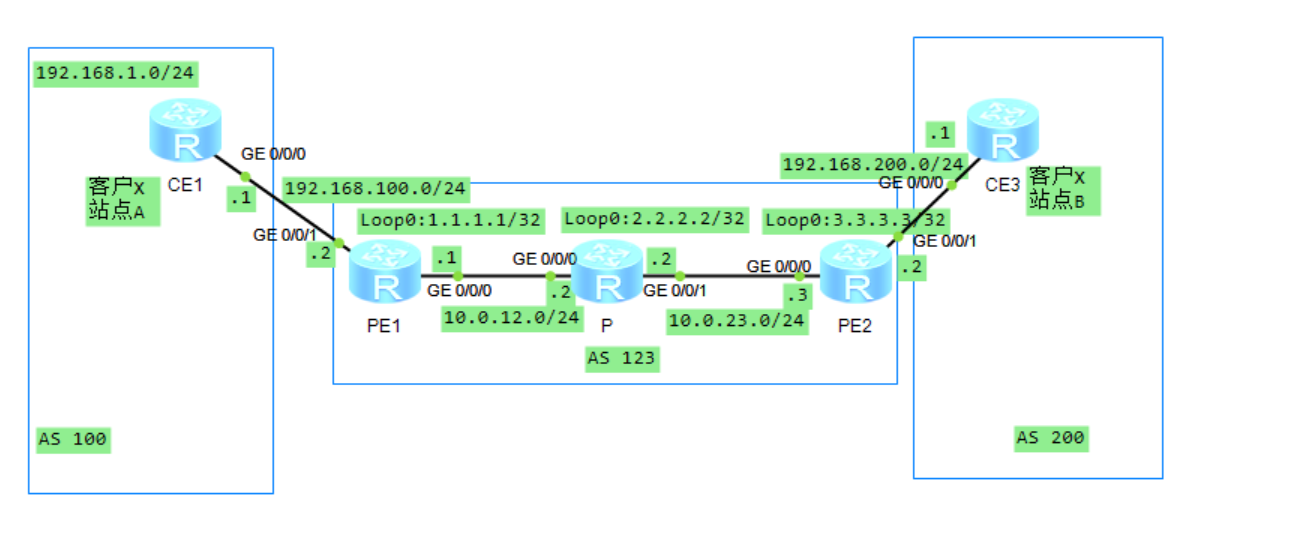
1.3 实验编制表
| 设备 | 接口 | IP地址 | 子网掩码 | 默认网关 |
|---|---|---|---|---|
| CE1(AR2220) | GE0/0/0 | 192.168.100.1 | 255.255.255.0 | N/A |
| CE3(AR2220) | GE0/0/0 | 192.168.200.1 | 255.255.255.0 | N/A |
| PE1(AR2220) | GE0/0/0 | 10.0.12.1 | 255.255.255.0 | N/A |
| PE1(AR2220) | GE0/0/1 | 192.168.100.2 | 255.255.255.0 | N/A |
| PE1(AR2220) | LoopBack0 | 1.1.1.1 | 255.255.255.255 | N/A |
| P(AR2220) | GE0/0/0 | 10.0.12.2 | 255.255.255.0 | N/A |
| P(AR2220) | GE0/0/1 | 10.0.23.2 | 255.255.255.0 | N/A |
| P(AR2220) | LoopBack0 | 2.2.2.2 | 255.255.255.255 | N/A |
| PE2(AR2220) | GE0/0/0 | 10.0.23.3 | 255.255.255.0 | N/A |
| PE2(AR2220) | GE0/0/1 | 192.168.200.2 | 255.255.255.0 | N/A |
| PE2(AR2220) | LoopBack0 | 3.3.3.3 | 255.255.255.255 | N/A |
1.4 PEVPN配置表
| 配置项 | PE1 | PE2 |
|---|---|---|
| VPN名称 | VPNX | VPNX |
| RD | 100:1 | 100:1 |
| IRT | 100:321 | 100:123 |
| ERT | 100:123 | 100:321 |
| 接口 | GE0/0/1 | GE0/0/1 |
| MP-BGP | 源接口:LoopBack0 | 源接口:LoopBack0 |
1.5 配置思路
1、MPLS VPN骨干网配置 * IGP配置,实现骨干网的IP连通性 * MPLS与MPLS LDP配置,建立MPLS LSP公网隧道,传输VPN数据 * MP-BGP配置,建立后续传递VPNv4路由的MP-BGP对等体关系
2、VPN用户接入配置 * 创建VPN实例并配置参数(RT、RD) * 将接口加入VPN实例 * 配置PE与CE之间的路由交换
1.6 实验步骤
1.6.1 基本配置
根据实验编址表,并使用Ping命令检测直连网段之间的连通性。
1.6.2 IGP配置
1、在MPLS VPN骨干网络内部署OSPF,MPLS VPN骨干网络内部署的OSPF用于实现骨干网络内部路由互通
[PE1]ospf 1 router-id 1.1.1.1
[PE1-ospf-1]area 0
[PE1-ospf-1-area-0.0.0.0]network 1.1.1.1 0.0.0.0
[PE1-ospf-1-area-0.0.0.0]network 10.0.12.1 0.0.0.0
[P]ospf 1 router-id 2.2.2.2
[P-ospf-1]area 0
[P-ospf-1-area-0.0.0.0]network 2.2.2.2 0.0.0.0
[P-ospf-1-area-0.0.0.0]network 10.0.12.2 0.0.0.0
[P-ospf-1-area-0.0.0.0]network 10.0.23.2 0.0.0.0
[PE2]ospf 1 router-id 3.3.3.3
[PE2-ospf-1]area 0
[PE2-ospf-1-area-0.0.0.0]network 3.3.3.3 0.0.0.0
[PE2-ospf-1-area-0.0.0.0]network 10.0.23.3 0.0.0.0
2、配置完成后,在P设备上查看OSPF邻居建立情况。观察到邻接关系建立。
[P]dis ospf peer brief

     OSPF Process 1 with Router ID 2.2.2.2
          Peer Statistic Information
 ----------------------------------------------------------------------------
 Area Id          Interface                        Neighbor id      State
 0.0.0.0          GigabitEthernet0/0/0             1.1.1.1          Full
 0.0.0.0          GigabitEthernet0/0/1             3.3.3.3          Full
 ----------------------------------------------------------------------------
1.6.3 MPLS与MPLS LDP配置
1、在PE1、P、PE2节点上配置MPLS与MPLS LDP
[PE1]mpls lsr-id 1.1.1.1
[PE1]mpls
Info: Mpls starting, please wait... OK!
[PE1-mpls]mpls ldp
[PE1]int g0/0/0
[PE1-GigabitEthernet0/0/0]mpls
[PE1-GigabitEthernet0/0/0]mpls ldp

[P]mpls lsr-id 2.2.2.2
[P]mpls
Info: Mpls starting, please wait... OK!
[P-mpls]mpls ldp
[P-mpls-ldp]qu
[P]int g0/0/0
[P-GigabitEthernet0/0/0]mpls
[P-GigabitEthernet0/0/0]mpls ldp
[P-GigabitEthernet0/0/0]int g0/0/1
[P-GigabitEthernet0/0/1]mpls
[P-GigabitEthernet0/0/1]mpls ldp

[PE2]mpls lsr-id 3.3.3.3
[PE2]mpls
Info: Mpls starting, please wait... OK!
[PE2-mpls]mpls ldp
[PE2-mpls-ldp]int g0/0/0
[PE2-GigabitEthernet0/0/0]mpls
[PE2-GigabitEthernet0/0/0]mpls ldp
1.6.4 MP-BGP配置
1、在PE1及PE2之间建立MP-BGP对等体关系
[PE1]bgp 123
[PE1-bgp]router-id 1.1.1.1
[PE1-bgp]peer 3.3.3.3 as 123
[PE1-bgp]peer 3.3.3.3 connect-interface loop 0
[PE1-bgp]ipv4-family vpnv4 unicast
[PE1-bgp-af-vpnv4]peer 3.3.3.3 enable

[PE2]bgp 123
[PE2-bgp]router-id 3.3.3.3
[PE2-bgp]peer 1.1.1.1 as 123
[PE2-bgp]peer 1.1.1.1 connect-interface loop 0
[PE2-bgp]ipv4-family vpnv4 unicast
[PE2-bgp-af-vpnv4]peer 1.1.1.1 enable
2、在PE1和PE2上查看公网隧道建立情况
[PE1]dis mpls lsp
-------------------------------------------------------------------------------
                 LSP Information: LDP LSP
-------------------------------------------------------------------------------
FEC                In/Out Label  In/Out IF                      Vrf Name
1.1.1.1/32         3/NULL        -/-
2.2.2.2/32         NULL/3        -/GE0/0/0
2.2.2.2/32         1024/3        -/GE0/0/0
3.3.3.3/32         NULL/1025     -/GE0/0/0
3.3.3.3/32         1025/1025     -/GE0/0/0

[PE2]dis mpls lsp
-------------------------------------------------------------------------------
                 LSP Information: LDP LSP
-------------------------------------------------------------------------------
FEC                In/Out Label  In/Out IF                      Vrf Name
1.1.1.1/32         NULL/1024     -/GE0/0/0
1.1.1.1/32         1024/1024     -/GE0/0/0
2.2.2.2/32         NULL/3        -/GE0/0/0
2.2.2.2/32         1025/3        -/GE0/0/0
3.3.3.3/32         3/NULL        -/-
3、在PE1和PE2查看MP-BGP邻居状态
[PE1]dis bgp vpnv4 all peer

 BGP local router ID : 1.1.1.1
 Local AS number : 123
 Total number of peers : 1        Peers in established state : 1

  Peer            V          AS  MsgRcvd  MsgSent  OutQ  Up/Down       State Pre
fRcv

  3.3.3.3         4         123        5        7     0 00:03:55 Established
   0

[PE2]dis bgp vpnv4 all peer

 BGP local router ID : 3.3.3.3
 Local AS number : 123
 Total number of peers : 1        Peers in established state : 1

  Peer            V          AS  MsgRcvd  MsgSent  OutQ  Up/Down       State Pre
fRcv

  1.1.1.1         4         123        5        5     0 00:03:23 Established
   0
1.6.5 VPN用户接入配置
1、在PE1和PE2上创建VPN实例并按照规划配置RD与RT参数
[PE1]ip vpn-instance VPNX
[PE1-vpn-instance-VPNX]route-distinguisher 100:1
[PE1-vpn-instance-VPNX-af-ipv4]vpn-target 100:321 import-extcommunity
 IVT Assignment result:
Info: VPN-Target assignment is successful.
[PE1-vpn-instance-VPNX-af-ipv4]vpn-target 100:123 export-extcommunity
 EVT Assignment result:
Info: VPN-Target assignment is successful.

[PE2]ip vpn-instance VPNX
[PE2-vpn-instance-VPNX]route-distinguisher 100:1
[PE2-vpn-instance-VPNX-af-ipv4]vpn-target 100:123 import-extcommunity
 IVT Assignment result:
Info: VPN-Target assignment is successful.
[PE2-vpn-instance-VPNX-af-ipv4]vpn-target 100:321 export-extcommunity
 EVT Assignment result:
Info: VPN-Target assignment is successful.
2、将接口绑定到VPN实例
[PE1]int g0/0/1
[PE1-GigabitEthernet0/0/1]ip binding vpn-instance VPNX
Info: All IPv4 related configurations on this interface are removed!
Info: All IPv6 related configurations on this interface are removed!
May 30 2022 20:37:41-08:00 PE1 %%01IFNET/4/LINK_STATE(l)[0]:The line protocol IP
 on the interface GigabitEthernet0/0/1 has entered the DOWN state.
[PE1-GigabitEthernet0/0/1]ip add 192.168.100.2 24

[PE2]int g0/0/1
[PE2-GigabitEthernet0/0/1]ip binding vpn-instance VPNX
Info: All IPv4 related configurations on this interface are removed!
Info: All IPv6 related configurations on this interface are removed!
May 30 2022 20:39:54-08:00 PE2 %%01IFNET/4/LINK_STATE(l)[11]:The line protocol I
P on the interface GigabitEthernet0/0/1 has entered the DOWN state.
[PE2-GigabitEthernet0/0/1]ip add 192.168.200.2 24
3、部署CE1-PE1、CE3-PE2之间的路由信息交互 (1)创建与实例绑定的OSPF进程
[PE1]ospf 2 vpn-instance VPNX
[PE1-ospf-2]area 0
[PE1-ospf-2-area-0.0.0.0]network 192.168.100.0 0.0.0.255

[PE2]ospf 2 vpn-instance VPNX
[PE2-ospf-2]area 0
[PE2-ospf-2-area-0.0.0.0]network 192.168.200.0 0.0.0.255
(2)配置OSPF进程与MP-BGP之间的路由双向引入
[PE1]ospf 2 vpn-instance VPNX
[PE1-ospf-2]import-route bgp
[PE1-ospf-2]bgp 123
[PE1-bgp]ipv4-family vpn-instance VPNX
[PE1-bgp-VPNX]import-route ospf 2

[PE2]ospf 2 vpn-instance VPNX
[PE2-ospf-2]import-route bgp
[PE2-ospf-2]bgp 123
[PE2-bgp]ipv4-family vpn-instance VPNX
[PE2-bgp-VPNX]import-route ospf 2