

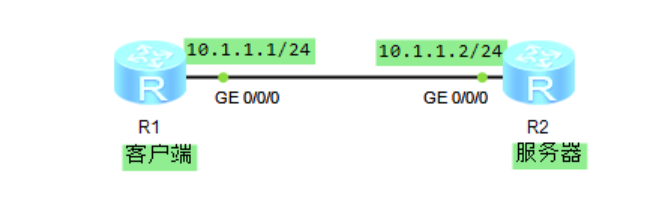
一、实验拓扑
二、实验需求
1、完成设备Telnet预配置
2、编写Python脚本,调用telnetlib登陆设备,然后查看配置
三、实验配置
1、设备命名
[Huawei]sysname Client
[Huawei]sysname Server
2、接口互联地址配置
[Client]interface GigabitEthernet0/0/0
[Client-GigabitEthernet0/0/0]ip address 10.1.1.2 24
[Server]interface GigabitEthernet0/0/0
[Server-GigabitEthernet0/0/0]ip address 10.1.1.2 24
3、Telnet服务配置
[Server]user-interface vty 0 4
[Server-ui-vty0-4]protocol inbound telnet
[Server-ui-vty0-4]set authentication password cipher HCIA-Datacom
[Server-ui-vty0-4]user privilege level 15
缺省情况下,认证模式为密码认证_
4、Telenet服务测试
<Client>telnet 10.1.1.2
Trying 10.1.1.2 ...
Press CTRL+K to abort
Connected to 10.1.1.2 ...
Login authentication
Password:
Info: The max number of VTY users is 10, and the number
      of current VTY users on line is 1.
      The current login time is 2021-10-08 17:13:18.
<Server>
5、Python代码编写
#使用import语句引入Telnet模块和time模块
from telnetlib  import Telnet
import time

#设定登录地址、用户名以及密码
host = "192.168.100.12"
user = "python"
password = "123"
#打印登录成功的提示信息
print(f"Signed in successfully  {host}!")

#执行Telnet()方法登录设备地址并将其赋值给变量tn
tn = Telnet(host)
#表示读取到'Username:'为止,其中b表示将python3默认的unicode编码变为bytes,这是函数对输入数据的要求
tn.read_until(b"Username:")
#表示转换password代表的字符串'HCIA-Datacom'的编码类型为ASCII,'+'代表连接符,'b'表示将python3默认的unicode编码变为bytes,这是函数对输入数据的要求,'\n'代表换行符
tn.write(user.encode('ascii') + b"\n")
#表示读取到'Password:'为止,其中b表示将python3默认的unicode编码变为bytes,这是函数对输入数据的要求
tn.read_until(b"Password:")
#表示转换password代表的字符串'HCIA-Datacom'的编码类型为ASCII,'+'代表连接符,'b'表示将python3默认的unicode编码变为bytes,这是函数对输入数据的要求,'\n'代表换行符
tn.write(password.encode('ascii') + b"\n")
#设置屏显长度为0
tn.write(b"screen-length 0 temporary\n")

#显示所有配置
tn.write(b"dis cu\n")

#程序暂停3秒
time.sleep(3)
#read_very_eager()表示读取当前尽可能多的数据,decode('ascii')表示将读取的数据解码为ASCII
output = tn.read_very_eager().decode('ascii')
print(output)
#关闭当前会话
tn.close()