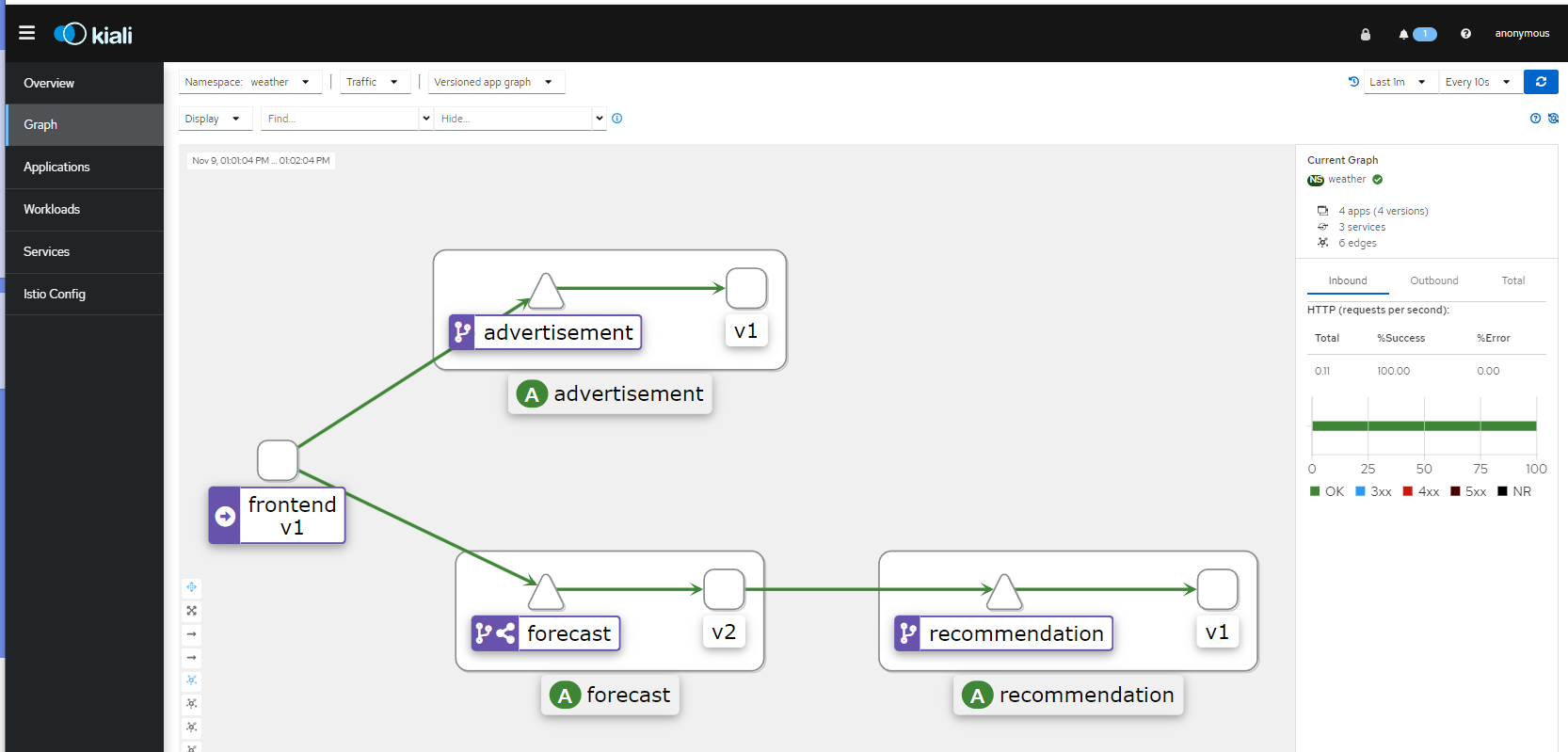

将frontend到forecast的流量一分为二,一半到forecast(v1)一半到forecast(v2),之后再继续更改流量比率,将v1改为0,v2改为100,从而达到灰度发布的效果。
2、更新DestinationRule
由于我们已经有到forecast的路由规则
[root@master01 ~]# cd cloud-native-istio/10_canary-release/10.2/
[root@master01 10.2]# kubectl get dr forecast-dr -n weather -o yaml
apiVersion: networking.istio.io/v1beta1
kind: DestinationRule
metadata:
  annotations:
    kubectl.kubernetes.io/last-applied-configuration: |
      {"apiVersion":"networking.istio.io/v1alpha3","kind":"DestinationRule","metadata":{"annotations":{},"name":"forecast-dr","namespace":"weather"},"spec":{"host":"forecast","subsets":[{"labels":{"version":"v1"},"name":"v1"}]}}
  creationTimestamp: "2023-11-09T01:59:24Z"
  generation: 1
  name: forecast-dr
  namespace: weather
  resourceVersion: "702849"
  uid: 5ff2bc37-e4fd-404f-b76b-36be05401267
spec:
  host: forecast
  subsets:
  - labels:
      version: v1
    name: v1
现在我们要更新一下,增加到v2的流量,可以直接apply forecast-v2-destination.yaml文件
[root@master01 ~]# cd cloud-native-istio/10_canary-release/10.2/
[root@master01 10.2]# kubectl apply -f forecast-v2-destination.yaml -n weather
再次查看规则
[root@master01 ~]# cd cloud-native-istio/10_canary-release/10.2/
[root@master01 10.2]# kubectl get dr forecast-dr -n weather -o yaml
[root@master01 10.2]#  kubectl get dr forecast-dr -n weather -o yaml
apiVersion: networking.istio.io/v1beta1
kind: DestinationRule
metadata:
  annotations:
    kubectl.kubernetes.io/last-applied-configuration: |
      {"apiVersion":"networking.istio.io/v1alpha3","kind":"DestinationRule","metadata":{"annotations":{},"name":"forecast-dr","namespace":"weather"},"spec":{"host":"forecast","subsets":[{"labels":{"version":"v1"},"name":"v1"},{"labels":{"version":"v2"},"name":"v2"}]}}
  creationTimestamp: "2023-11-09T01:59:24Z"
  generation: 2
  name: forecast-dr
  namespace: weather
  resourceVersion: "730042"
  uid: 5ff2bc37-e4fd-404f-b76b-36be05401267
spec:
  host: forecast
  subsets:
  - labels:
      version: v1
    name: v1
  - labels:
      version: v2
    name: v2
3、更新路由规则
[root@master01 ~]# cd cloud-native-istio/10_canary-release/10.2/
[root@master01 10.2]# kubectl apply -f vs-forecast-weight-based-50.yaml -n weather
查看路由规则
[root@master01 10.2]# kubectl get vs -n weather forecast-route -o yaml
apiVersion: networking.istio.io/v1beta1
kind: VirtualService
metadata:
  annotations:
    kubectl.kubernetes.io/last-applied-configuration: |
      {"apiVersion":"networking.istio.io/v1alpha3","kind":"VirtualService","metadata":{"annotations":{},"name":"forecast-route","namespace":"weather"},"spec":{"hosts":["forecast"],"http":[{"route":[{"destination":{"host":"forecast","subset":"v1"},"weight":50},{"destination":{"host":"forecast","subset":"v2"},"weight":50}]}]}}
  creationTimestamp: "2023-11-09T01:59:22Z"
  generation: 2
  name: forecast-route
  namespace: weather
  resourceVersion: "730466"
  uid: 37e35b32-7449-4c5f-832a-178fe1a55583
spec:
  hosts:
  - forecast
  http:
  - route:
    - destination:
        host: forecast
        subset: v1
      weight: 50
    - destination:
        host: forecast
        subset: v2
      weight: 50
在浏览器中输入http://192.168.1.60:3000/dashboard,点击各个地区
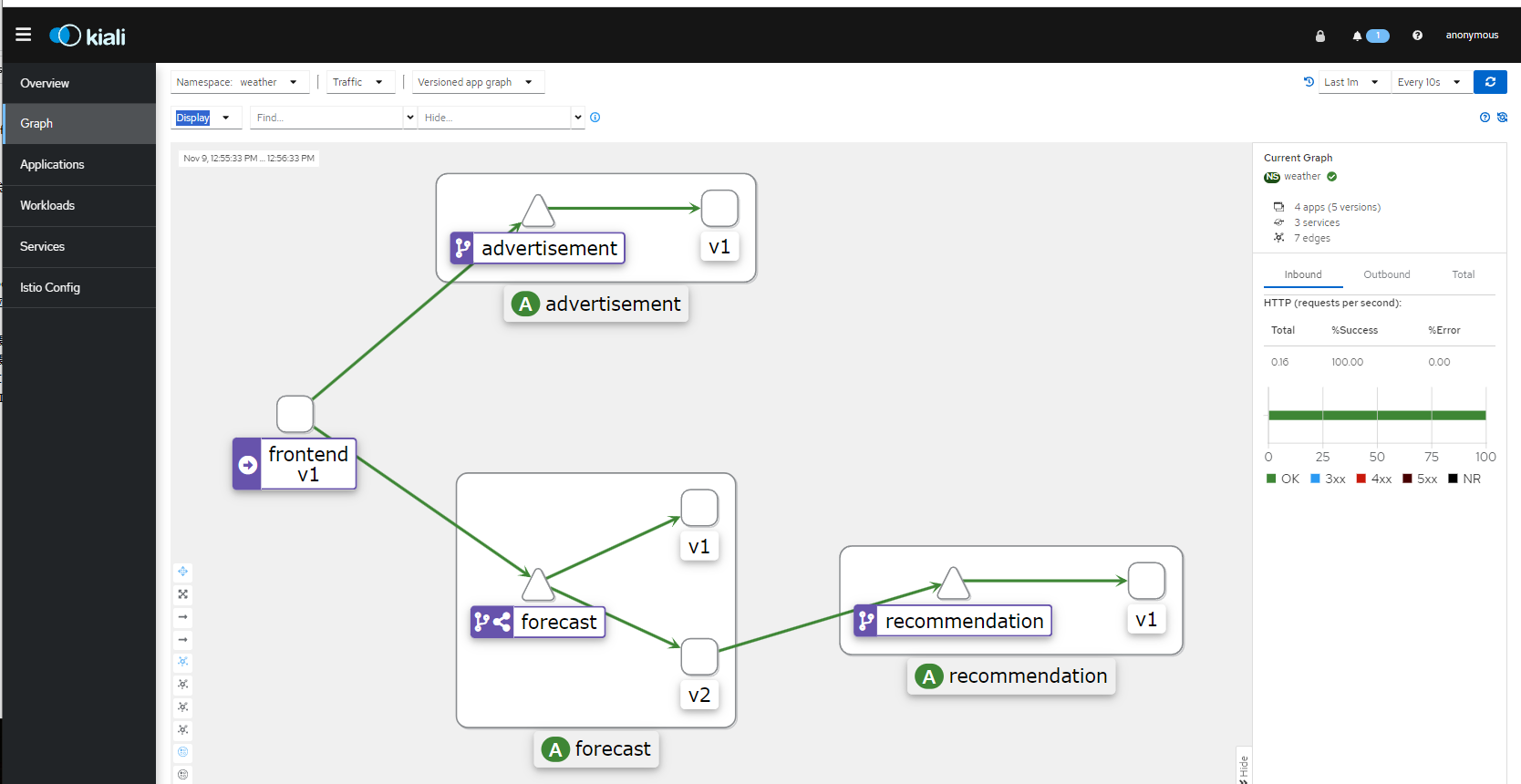
在浏览器输入http://192.168.1.60:15029/kiali访问kiali查看v1和v2流量分布各占一半
4、继续更改流量比例
[root@master01 ~]# cd cloud-native-istio/10_canary-release/10.2/
[root@master01 10.2]# kubectl apply -f vs-forecast-weight-based-v2.yaml -n weather
查看路由规则
[root@master01 10.2]# kubectl get vs -n weather forecast-route -o yaml
apiVersion: networking.istio.io/v1beta1
kind: VirtualService
metadata:
  annotations:
    kubectl.kubernetes.io/last-applied-configuration: |
      {"apiVersion":"networking.istio.io/v1alpha3","kind":"VirtualService","metadata":{"annotations":{},"name":"forecast-route","namespace":"weather"},"spec":{"hosts":["forecast"],"http":[{"route":[{"destination":{"host":"forecast","subset":"v1"},"weight":0},{"destination":{"host":"forecast","subset":"v2"},"weight":100}]}]}}
  creationTimestamp: "2023-11-09T01:59:22Z"
  generation: 3
  name: forecast-route
  namespace: weather
  resourceVersion: "731773"
  uid: 37e35b32-7449-4c5f-832a-178fe1a55583
spec:
  hosts:
  - forecast
  http:
  - route:
    - destination:
        host: forecast
        subset: v1
      weight: 0
    - destination:
        host: forecast
        subset: v2
      weight: 100
在浏览器中输入http://192.168.1.60:3000/dashboard,点击各个地区
在浏览器输入http://192.168.1.60:15029/kiali访问kiali查看全部为v2流量