

一、前言
二、基础功能
官方站点:https://apisix.apache.org/zh/
2.1 基础架构剖析
APISIX 的核心架构采用层次化设计:
Nginx:底层依赖 Nginx 提供高效的网络通信和数据传输;
OpenResty:通过 OpenResty 封装的 Lua 环境,实现灵活的逻辑控制和业务扩展。
ETCD:APISIX 利用 ETCD 作为分布式键值存储系统,使得所有节点上的配置能够实时同步并动态更新, 从而确保整个服务集群具备高度的弹性和一致性。
插件系统:APISIX 提供了一个强大的插件生态系统,这些插件可自由组合以满足不同场景下的功能需 求,如身份验证(Key Auth、JWT、Basic Auth)、限流限速、熔断、灰度发布、A/B 测试等。
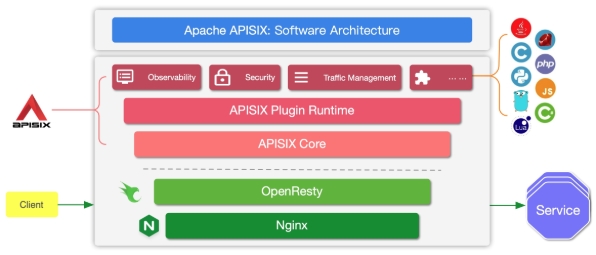
APISIX 基于 Nginx 和 ETCD,与传统 API 网关相比,APISIX 具有动态路由和热加载插件功能,避免了配 置之后的 reload 操作,同时 APISIX 支持 HTTP(S)、HTTP2、Dubbo、QUIC、MQTT、TCP/UDP 等更多 的协议。而且还内置了 Dashboard,提供强大而灵活的界面。同样也提供了丰富的插件支持功能,而且 还可以让用户自定义插件。
三、架构剖析
云原生模式下的 APISIX 架构:
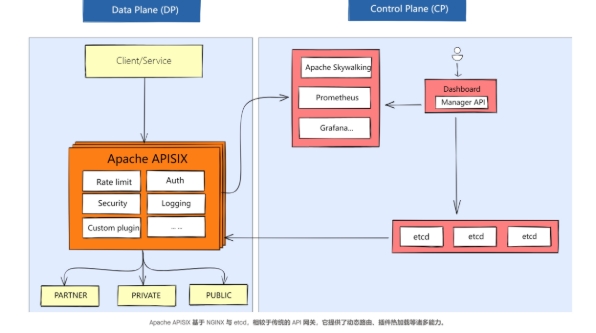
如上图所示,左右分别是 APISIX 的数据面(Data Plane)和控制面(Control Plane):
-
数据面:以 NGINX 的网络库为基础(未使用 NGINX 的路由匹配、静态配置和 C 模块),使用 Lua 和 NGINX 动态控制请求流量;
-
控制面:使用 etcd 来存储和同步网关的配置数据,管理员通过 Admin API 或者 Dashboard 可以 在毫秒级别内通知到所有数据面节点。
在更新数据上,Kong 采用轮询数据库的方式,但是可能需要 5 -10 秒才能获取到最新的配置;而 APISIX 则采用监听 etcd 的配置变更的方式,可以将时间控制在毫秒级,达到实时生效的效果。 而且由于 APISIX 和 etcd 均支持多点部署,因此在 APISIX 当前架构中,任何一个服务出现异常宕机等事故,都不会影响 APISIX 正常对外提供服务的能力。
四、基于 K8S 的 APISIX
APISIX Ingress Controller:支持全动态,无需重启加载,同时继承了 APISIX 的所有优势,还支持原生 Kubernetes CRD,方便用户迁移。
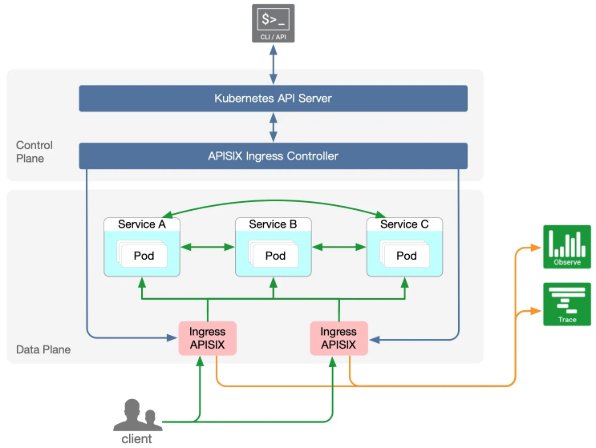
APISIX Ingress Controller 的工作原理如下:
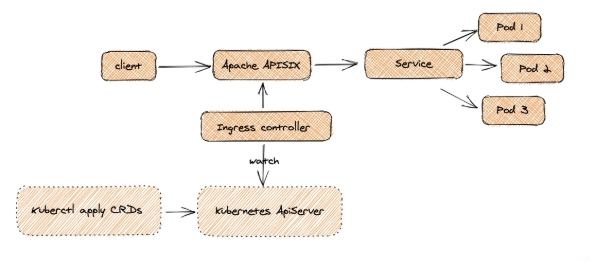
客户端请求直达 Apache APISIX 数据面,该数据面直接将流量高效转发至后端Service Pod,无需通过 Ingress Controller,保障了流量转发的稳定性和变更操作(如扩缩容、迁移等)对用户透明无影响。
配置层面,用户通过 Kubernetes API 创建 CRD 资源,Ingress Controller 实时监听这些资源变更,并通 过 Admin API 将配置同步至 Apache APISIX。整体采用数据面与控制面分离架构,使得数据面可根据需求灵活部署在 K8s 内外,增强了服务的稳定性和部署灵活性,避免了类似 Ingress Nginx 中控制面故障导致整个 Pod 失效的问题,提高了业务连续性和架构调整便利性。
APISIX Ingress 控制器目前支持的核心特性包括:
-
全动态配置,支持高级路由匹配规则;
-
支持 CRD,更容易理解声明式配置;
-
兼容原生 Ingress 资源对象(v1 和 v1beta1);
-
支持流量切分;
-
服务自动注册发现,无惧扩缩容;
-
更灵活的负载均衡策略,自带健康检查功能;
-
支持 gRPC plaintext 与 TCP 4 层代理。
-
可与 Apache APISIX 官方 50 多个插件 & 客户自定义插件进行扩展使用;
五、基于 Helm 方式的部署管理
通过 Helm Chart 来进行安装,首先添加官方提供的 Helm Chart 仓库:
# 添加Helm Chart仓库

[root@master01 16]# helm repo add apisix https://charts.apiseven.com

# 更新本地Helm Chart仓库

[root@master01 16]# helm repo update

# 查找apisix版本

[root@master01 16]# helm search repo apisix

NAME                                CHART VERSION   APP VERSION DESCRIPTION

apisix/apisix                       2.10.0          3.11.0      A Helm chart for Apache APISIX v3

apisix/apisix-dashboard             0.8.2           3.0.0       A Helm chart for Apache APISIX Dashboard

apisix/apisix-ingress-controller    0.14.0          1.8.0       Apache APISIX Ingress Controller for Kubernetes

bitnami/apisix                      4.2.2           3.12.0      Apache APISIX is high-performance, real-time AP...
创建apisix所需namespces:
[root@master01 16]# kubectl create ns ingress-apisix
安装apisix,dashboard,controller:
注意点:
-
apisix-gateway,默认为 NodePort 的方式;
-
当前集群内已经提供 LB 的支持;
-
当前集群内已经提供 pvc 的自动供给。
$ helm install apisix apisix/apisix \

  --set apisix.ssl.enabled=true \

  --set service.type=LoadBalancer \

  --set ingress-controller.enabled=true \

  --namespace ingress-apisix \

  --set dashboard.enabled=true \

  --set ingress-controller.config.apisix.serviceNamespace=ingress-apisix \

  --set timezone=Asia/Shanghai \

  --set apisix.serviceMonitor.enabled=true \

  --set apisix.serviceMonitor.namespace=ingress-apisix
APISIX参考文档:https://github.com/apache/apisix-helm- chart/blob/master/charts/apisix/README.md
APISIX-Ingress参考文档:https://github.com/apache/apisix-helm-chart/blob/master/charts/apisix- ingress-controller/README.md
APISIX-Dashboard参考文档:https://github.com/apache/apisix-helm- chart/blob/master/charts/apisix-dashboard/README.md
也可以根据如上配置,选择本地的 helm 方式进行修改及后续的维护更新:
# 默认下载当前最新版本

helm fetch apisix/apisix

# 也可以选择指定版本下载

helm fetch apisix/apisix --version 2.6.0
本实验采用2.6.0版本进行安装
[root@master01 16]# helm fetch apisix/apisix --version 2.6.0

[root@master01 16]# tar xf apisix-2.6.0.tgz

[root@master01 16]# cd apisix/

[root@master01 apisix]# vim values.yaml

#修改第27行内容

 27   repository: registry.cn-hangzhou.aliyuncs.com/abroad_images/apisix

#修改第94行内容

 94 timezone: "Asia/Shanghai"

#修改第136行内容

136   image: registry.cn-hangzhou.aliyuncs.com/abroad_images/busybox

#修改第162行内容

162   type: LoadBalancer

#修改第221行内容

221     enabled: true

#修改第223行内容

223     namespace: "ingress-apisix"

#修改第263行内容

263     enabled: true

#修改第575行内容

575   enabled: true

#修改第591行内容

591   enabled: true

#第594行下面新增下面内容

595       serviceNamespace: "ingress-apisix"

#完整配置文件

[root@master01 apisix]# egrep -v "#|^$" values.yaml

global:

  imagePullSecrets: []

image:

  repository: registry.cn-hangzhou.aliyuncs.com/abroad_images/apisix

  pullPolicy: IfNotPresent

  tag: 3.8.0-debian

useDaemonSet: false

replicaCount: 1

priorityClassName: ""

podAnnotations: {}

podSecurityContext: {}

securityContext: {}

podDisruptionBudget:

  enabled: false

  minAvailable: 90%

  maxUnavailable: 1

resources: {}

hostNetwork: false

nodeSelector: {}

tolerations: []

affinity: {}

timezone: "Asia/Shanghai"

extraEnvVars: []

updateStrategy: {}

extraDeploy: []

extraVolumes: []

extraVolumeMounts: []

extraInitContainers: []

extraContainers: []

initContainer:

  image: registry.cn-hangzhou.aliyuncs.com/abroad_images/busybox

  tag: 1.28

autoscaling:

  enabled: false

  version: v2

  minReplicas: 1

  maxReplicas: 100

  targetCPUUtilizationPercentage: 80

  targetMemoryUtilizationPercentage: 80

nameOverride: ""

fullnameOverride: ""

serviceAccount:

  create: false

  annotations: {}

  name: ""

rbac:

  create: false

service:

  type: LoadBalancer

  externalTrafficPolicy: Cluster

  externalIPs: []

  http:

    enabled: true

    servicePort: 80

    containerPort: 9080

    additionalContainerPorts: []

  tls:

    servicePort: 443

  stream:

    enabled: false

    tcp: []

    udp: []

  labelsOverride: {}

ingress:

  enabled: false

  servicePort:

  annotations: {}

  hosts:

    - host: apisix.local

      paths: []

  tls: []

metrics:

  serviceMonitor:

    enabled: true

    namespace: "ingress-apisix"

    name: ""

    interval: 15s

    labels: {}

    annotations: {}

apisix:

  enableIPv6: true

  enableServerTokens: true

  setIDFromPodUID: false

  luaModuleHook:

    enabled: false

    luaPath: ""

    hookPoint: ""

    configMapRef:

      name: ""

      mounts:

        - key: ""

          path: ""

  ssl:

    enabled: true

    containerPort: 9443

    additionalContainerPorts: []

    existingCASecret: ""

    certCAFilename: ""

    http2:

      enabled: true

    sslProtocols: "TLSv1.2 TLSv1.3"

    fallbackSNI: ""

  router:

    http: radixtree_host_uri

  fullCustomConfig:

    enabled: false

    config: {}

  deployment:

    mode: traditional

    role: "traditional"

  admin:

    enabled: true

    type: ClusterIP

    externalIPs: []

    ip: 0.0.0.0

    port: 9180

    servicePort: 9180

    cors: true

    credentials:

      admin: <admin-api-key>

      viewer: <viewer-api-key>

      secretName: ""

    allow:

      ipList:

        - 127.0.0.1/24

    ingress:

      enabled: false

      annotations:

        {}

      hosts:

        - host: apisix-admin.local

          paths:

            - "/apisix"

      tls: []

  nginx:

    workerRlimitNofile: "20480"

    workerConnections: "10620"

    workerProcesses: auto

    enableCPUAffinity: true

    keepaliveTimeout: 60s

    envs: []

    logs:

      enableAccessLog: true

      accessLog: "/dev/stdout"

      accessLogFormat: '$remote_addr - $remote_user [$time_local] $http_host \"$request\" $status $body_bytes_sent $request_time \"$http_referer\" \"$http_user_agent\" $upstream_addr $upstream_status $upstream_response_time \"$upstream_scheme://$upstream_host$upstream_uri\"'

      accessLogFormatEscape: default

      errorLog: "/dev/stderr"

      errorLogLevel: "warn"

    configurationSnippet:

      main: |

      httpStart: |

      httpEnd: |

      httpSrv: |

      httpAdmin: |

      stream: |

    customLuaSharedDicts: []

  discovery:

    enabled: false

    registry: {}

  dns:

    resolvers:

      - 127.0.0.1

      - 172.20.0.10

      - 114.114.114.114

      - 223.5.5.5

      - 1.1.1.1

      - 8.8.8.8

    validity: 30

    timeout: 5

  vault:

    enabled: false

    host: ""

    timeout: 10

    token: ""

    prefix: ""

  prometheus:

    enabled: false

    path: /apisix/prometheus/metrics

    metricPrefix: apisix_

    containerPort: 9091

  plugins: []

  stream_plugins: []

  pluginAttrs: {}

  extPlugin:

    enabled: false

    cmd: ["/path/to/apisix-plugin-runner/runner", "run"]

  wasm:

    enabled: false

    plugins: []

  customPlugins:

    enabled: false

    luaPath: "/opts/custom_plugins/?.lua"

    plugins:

      - name: "plugin-name"

        attrs: {}

        configMap:

          name: "configmap-name"

          mounts:

            - key: "the-file-name"

              path: "mount-path"

externalEtcd:

  host:

    - http://etcd.host:2379

  user: root

  password: ""

  existingSecret: ""

  secretPasswordKey: "etcd-root-password"

etcd:

  enabled: true

  prefix: "/apisix"

  timeout: 30

  auth:

    rbac:

      create: false

      rootPassword: ""

    tls:

      enabled: false

      existingSecret: ""

      certFilename: ""

      certKeyFilename: ""

      verify: true

      sni: ""

  service:

    port: 2379

  replicaCount: 3

dashboard:

  enabled: true

  config:

    conf:

      etcd:

        endpoints:

          - apisix-etcd:2379

        prefix: "/apisix"

        username: ~

        password: ~

ingress-controller:

  enabled: true

  config:

    apisix:

      adminAPIVersion: "v3"

      serviceNamespace: "ingress-apisix"

#修改镜像为国内镜像

[root@master01 apisix]# vim charts/apisix-dashboard/values.yaml

...

 26   repository: registry.cn-hangzhou.aliyuncs.com/github_images1024/apisix-dashboard

...

#修改镜像为国内镜像

[root@master01 apisix]# vim charts/etcd/values.yaml

...

 71   registry: registry.cn-hangzhou.aliyuncs.com

 72   repository: github_images1024/etcd

...

#修改镜像为国内镜像

[root@master01 apisix]# vim charts/apisix-ingress-controller/values.yaml

...

 49   repository: registry.cn-hangzhou.aliyuncs.com/github_images1024/apisix-ingress-controller

 69       repository: registry.cn-hangzhou.aliyuncs.com/github_images1024/apisix

...

#修改镜像为国内镜像

[root@master01 apisix]# vim charts/etcd/values.yaml

...

616     registry: registry.cn-hangzhou.aliyuncs.com

617     repository: github_images1024/bitnami-shell

...

#修改镜像为国内镜像

[root@master01 apisix]# vim charts/apisix-ingress-controller/values.yaml

...

163   image: registry.cn-hangzhou.aliyuncs.com/abroad_images/busybox

...
正式安装
[root@master01 apisix]#

helm install apisix /root/16/apisix \

-n ingress-apisix \

-f values.yaml

#回显

NAME: apisix

LAST DEPLOYED: Sun Apr 20 14:57:55 2025

NAMESPACE: ingress-apisix

STATUS: deployed

REVISION: 1

NOTES:

1. Get the application URL by running these commands:

     NOTE: It may take a few minutes for the LoadBalancer IP to be available.

           You can watch the status of by running 'kubectl get --namespace ingress-apisix svc -w apisix-gateway'

  export SERVICE_IP=$(kubectl get svc --namespace ingress-apisix apisix-gateway --template "{{ range (index .status.loadBalancer.ingress 0) }}{{.}}{{ end }}")

  echo http://$SERVICE_IP:80
六、查看 ingress-apisix 相关资源
1)查看pvc是否已绑定
[root@master01 apisix]# kubectl get pvc -n ingress-apisix

NAME                 STATUS   VOLUME                                     CAPACITY   ACCESS MODES   STORAGECLASS   AGE

data-apisix-etcd-0   Bound    pvc-7867cd38-3d89-4420-891a-b03a07a507a6   8Gi        RWO            nfs-storage    84m

data-apisix-etcd-1   Bound    pvc-00a9deb4-f69b-4ddc-8d79-481db181e679   8Gi        RWO            nfs-storage    84m

data-apisix-etcd-2   Bound    pvc-0f1aeb99-e4de-486b-a881-9d717cf85e08   8Gi        RWO            nfs-storage    84m
2)查看apisix的pod是否启动
[root@master01 apisix]# kubectl get pod -n ingress-apisix

NAME                                         READY   STATUS    RESTARTS        AGE

apisix-669858fcc7-lj8tc                      1/1     Running   0               5m52s

apisix-dashboard-766d98954c-s7m6n            1/1     Running   3 (4m51s ago)   5m52s

apisix-etcd-0                                1/1     Running   0               5m52s

apisix-etcd-1                                1/1     Running   0               5m52s

apisix-etcd-2                                1/1     Running   0               5m52s

apisix-ingress-controller-559f594fc9-w8rhv   1/1     Running   0               5m52s
3)查看svc
[root@master01 apisix]# kubectl get svc -n ingress-apisix

NAME                                       TYPE           CLUSTER-IP        EXTERNAL-IP   PORT(S)                      AGE

apisix-admin                               ClusterIP      <apisix-admin-cluster-ip>    <none>        9180/TCP                     10m

apisix-dashboard                           ClusterIP      <apisix-dashboard-cluster-ip>    <none>        80/TCP                       10m

apisix-etcd                                ClusterIP      <etcd-cluster-ip>   <none>        2379/TCP,2380/TCP            10m

apisix-etcd-headless                       ClusterIP      None              <none>        2379/TCP,2380/TCP            10m

apisix-gateway                             LoadBalancer   <apisix-gateway-cluster-ip>   <gateway-ip>     80:30472/TCP,443:31040/TCP   10m

apisix-ingress-controller                  ClusterIP      <ingress-controller-cluster-ip>     <none>        80/TCP                       10m

apisix-ingress-controller-apisix-gateway   NodePort       <gateway-nodeport-cluster-ip>   <none>        80:30937/TCP,443:30854/TCP   10m
七、通过 apisix 配置 dashboard 路由
dashboard 默认 账号和密码是 admin admin;
[root@master01 16]#

cat > dashboard-ing.yml <<EOF

apiVersion: apisix.apache.org/v2

kind: ApisixRoute

metadata:

  name: dashboard

  namespace: ingress-apisix

spec:

  http:

    - name: root

      match:

        hosts:

          - apisix.example.com

        paths:

          - '/*'

      backends:

        - serviceName: apisix-dashboard

          servicePort: 80

EOF

# 应用

[root@master01 16]# kaf dashboard-ing.yml
验证
[root@master01 16]# kubectl get ar -A

NAMESPACE        NAME        HOSTS                       URIS     AGE

ingress-apisix   dashboard   ["apisix.example.com"]   ["/*"]   14s
通过公有云域名进行解析:
# A记录

<gateway-ip> apisix.example.com

浏览器访问,账号密码都为admin:

八、验证测试
8.1 生成 httpbin 验证
[root@master01 16]#

cat > httpbin-dp-svc.yaml <<EOF

apiVersion: apps/v1

kind: Deployment

metadata:

  annotations:

  labels:

    app: httpbin

  name: httpbin

  namespace: default

spec:

  replicas: 1

  selector:

    matchLabels:

      app: httpbin

  template:

    metadata:

      labels:

        app: httpbin

    spec:

      containers:

      - image: registry.cn-hangzhou.aliyuncs.com/abroad_images/httpbin:latest

        imagePullPolicy: Always

        name: httpbin

      dnsPolicy: ClusterFirst

      restartPolicy: Always

---

apiVersion: v1

kind: Service

metadata:

  labels:

    app: httpbin

  name: httpbin

  namespace: default

spec:

  ports:

  - port: 80

    protocol: TCP

    targetPort: 80

  selector:

    app: httpbin

  sessionAffinity: None

  type: ClusterIP

EOF
8.2 配置 apisix 路由
[root@master01 16]#

cat > httpbin-ing.yaml <<EOF

apiVersion: apisix.apache.org/v2

kind: ApisixRoute

metadata:

  name: default-route

  namespace: default

spec:

  http:

  - backends:

    - serviceName: httpbin

      servicePort: 80

    match:

      hosts:

      - httpbin.example.com

      paths:

      - /httpbin*

      - /spec.json

    name: httpbin-route

    plugins:

    - config:

        regex_uri:

        - ^/httpbin(/|$)(.*)

        - /

      enable: true

      name: proxy-rewrite

EOF
8.3 部署验证
# 应用

[root@master01 16]# kubectl apply -f httpbin-dp-svc.yaml

[root@master01 16]# kubectl apply -f httpbin-ing.yaml

# 验证

[root@master01 16]# kubectl get pod,svc | grep httpbin

pod/httpbin-597cd879f5-p6vml                   1/1     Running   0                49s

service/httpbin                      ClusterIP      <httpbin-service-ip>    <none>        80/TCP         49s

[root@master01 16]# kubectl get ar -A

NAMESPACE        NAME            HOSTS                        URIS                         AGE

default          default-route   ["httpbin.example.com"]   ["/httpbin*","/spec.json"]   5m8s

ingress-apisix   dashboard       ["apisix.example.com"]    ["/*"]                       47m
对应的解析域名 httpbin.example.com 到 <gateway-ip> ;
测试基于 apisix 的路由是否工作:
[root@master01 16]# curl -I httpbin.example.com/httpbin

HTTP/1.1 200 OK

Content-Type: text/html; charset=utf-8

Content-Length: 9593

Connection: keep-alive

Date: Sun, 20 Apr 2025 08:07:14 GMT

Access-Control-Allow-Origin: *

Access-Control-Allow-Credentials: true

Server: APISIX/3.8.0
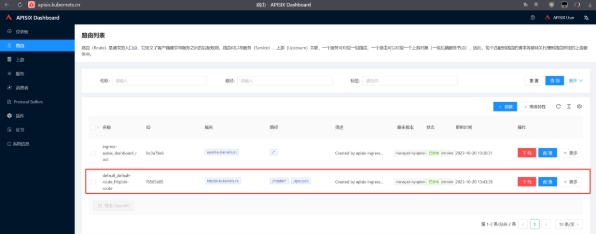
8.4 webUI 查看路由
登录http://apisix.example.com/,点击【路由】
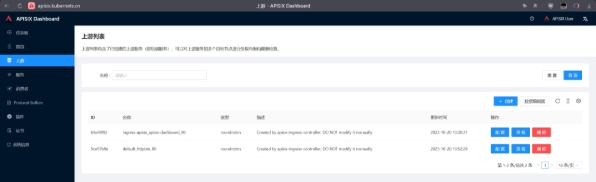
登录http://apisix.example.com/,点击【上游】
九、总结
Apache APISIX 是一款由 Apache 软件基金会孵化并管理的开源、云原生、高性能API网关,它基于 Nginx 和 ETCD 实现,特别适用于处理高并发和分布式环境下的 API 流量管理。以下是 APISIX 的主要特点和功能总结:
-
动态、实时配置:支持热更新,无需重启服务即可添加、删除或更改路由、插件、上游服务等配 置。
-
流量管理功能丰富:提供负载均衡、动态上游选择、灰度发布(金丝雀发布)、服务熔断、限流、 重试等策略,确保服务稳定性和弹性伸缩。
-
安全防护:内置多种身份认证方式,支持JWT、OAuth2.0、Basic Auth等,可实现 API 级别的权限 控制。
-
可观测性:集成了完善的监控和日志功能,方便进行 API 调用跟踪、性能分析及异常检测。
-
插件体系完善:拥有大量的官方和社区贡献的插件,可以根据需求自由组合,满足定制化需求。
-
云原生兼容性:作为 Kubernetes Ingress Controller,可以与 Kubernetes 紧密集成,支持 CRD 自定义资源对象,实现服务发现和配置自动化。
-
高性能架构:基于 Nginx/OpenResty,能够处理高并发请求,具有极高的吞吐量和低延迟特性。
-
广泛适用性:既可以处理南北向流量(客户端到服务端),也能处理东西向流量(服务间通信), 适用于微服务架构、云环境及其他业务场景。
-
易于使用和部署:提供友好的图形化管理界面和简单的命令行工具,支持一键部署和扩展。
Apache APISIX 作为新一代 API 网关解决方案,因其开放、可扩展、高性能和云原生的特点,在云服务、企业内部服务治理、微服务架构等领域获得了广泛应用。