
一、使用Prometheus监控Jenkins
1.1 安装使用插件
- https://plugins.jenkins.io/prometheus/
Default namespace: monitoring Prometheus安装的Namespace
检查 Jenkins 暴露的 promtheus 数据
http://192.168.33.1:30080/promtheus
1.2 安装Prometheus Operator安装Prometheus
kubectl create ns monitoring
prometheus-operator-values.yml
## We don't need the alertmanager for this demo
alertmanager:
  enabled: false

## This configuration means all ServiceMonitors in the namespsace will be picked up
## Use with caution!
prometheus:
  prometheusSpec:
    serviceMonitorSelectorNilUsesHelmValues: false
    serviceMonitorSelector: {}
grafana:
  persistence:
    enabled: true
    type: pvc
    size: 1G
    storageClassName: hostpath
$ helm install kube-prom stable/prometheus-operator -f prometheus-operator-values.yml --namespace monitoring

 kubectl get pod  -n monitoring
NAME                                                  READY   STATUS              RESTARTS   AGE
kube-prom-grafana-58dd7948b9-8pc4z                    2/2     Running             0          16h
kube-prom-grafana-test                                0/1     Error               0          16h
kube-prom-kube-state-metrics-d5554cd6-lpjtt           1/1     Running             0          16h
kube-prom-prometheus-node-exporter-w7ts8              1/1     Running             0          16h
kube-prom-prometheus-opera-admission-create-trvmv     0/1     ContainerCreating   0          16h
kube-prom-prometheus-opera-operator-8b968895f-dmd8c   2/2     Running             0          16h
prometheus-kube-prom-prometheus-opera-prometheus-0    3/3     Running             1          16h
1.3 为Jenkins Service创建ServiceMonitor
jenkins-sm.yaml
apiVersion: monitoring.coreos.com/v1
kind: ServiceMonitor
metadata:
  name: jenkins
  labels:
    prometheus: kube-prometheus
spec:
  selector:
    # note, this matches on the service, not the deployment or pod
    matchLabels:
      k8s-app: jenkins
  # jobLabel: app
  namespaceSelector:
    matchNames:
      - devops
  endpoints:
  - targetPort: 30080
    path: /prometheus
    interval: 10s
$  kubectl get servicemonitor
NAME      AGE
jenkins   14h
稍等一会儿, prometheus 会自动加载Jenkins 的 target
1.4 在Grafana中 添加Jenkins的dashboard
1.4.1 下载Grafana json dashboard
https://grafana.com/grafana/dashboards/9964
1.4.2 Grafana中加载json dashboard
二、Jenkins+InfluxDB+Grafana收集构建数据
2.1 步骤与方案
2.1.1 具体步骤
1、搭建jenkins、InfluxDB、Grafana。 2、Jenkins安装插件、配置数据库地址、编写Pipeline、自定义数据。 3、InfluxDB创建数据库、创建用户。 4、Grafana建立统一的度量模板,使用变量替换固定的项目名称。
2.1.2 整体方案
2.2 快速安装InfluxDB
influxdb.yml
---
kind: Deployment
apiVersion: apps/v1
metadata:
  labels:
    k8s-app: influxdb
  name: influxdb
  namespace: devops
spec:
  replicas: 1
  revisionHistoryLimit: 10
  selector:
    matchLabels:
      k8s-app: influxdb
  template:
    metadata:
      labels:
        k8s-app: influxdb
      namespace: devops
      name: influxdb
    spec:
      containers:
        - name: influxdb
          image: influxdb:1.7.9
          imagePullPolicy: IfNotPresent
          ports:
            - containerPort: 8086
              name: web2
              protocol: TCP
          resources:
            limits:
              cpu: 1000m
              memory: 2Gi
            requests:
              cpu: 500m
              memory: 512Mi
          volumeMounts:
            - name: dbhome
              mountPath: /var/lib/influxdb
      volumes:
        - name: dbhome
          hostPath:
            path: .../Jenkins/influxdb
            type: Directory
---
apiVersion: v1
kind: Service
metadata:
 name: influxdb
 namespace: devops
 labels:
   k8s-app: influxdb
spec:
 selector:
   k8s-app: influxdb
 type: NodePort
 ports:
 - name: web
   port: 8086
   targetPort: 8086
   nodePort: 30086
$ kubectl get pod -n devops | grep inf
influxdb-6476d5bddd-vmhw2       1/1     Running   1          24h
2.3 准备工作
2.3.1 创建数据库
$ curl -G http://localhost:30086/query --data-urlencode "q=SHOW DATABASES"
{"results":[{"statement_id":0,"series":[{"name":"databases","columns":["name"],"values":[["_internal"]]}]}]}
$ curl -X POST http://localhost:30086/query --data-urlencode "q=CREATE DATABASE jenkins"

$ curl -G http://localhost:30086/query --data-urlencode "q=SHOW DATABASES"
{"results":[{"statement_id":0,"series":[{"name":"databases","columns":["name"],"values":[["_internal"],["jenkins"]]}]}]}

$ curl -X POST http://localhost:30086/query --data-urlencode "q=CREATE USER jenkins WITH PASSWORD 'root123' WITH ALL
PRIVILEGES"
{"results":[{"statement_id":0}]}

$ curl -G http://localhost:30086/query --data-urlencode "q=SHOW USERS"
{"results":[{"statement_id":0,"series":[{"columns":["user","admin"],"values":[["jenkins",true]]}]}]}
2.3.2 配置Jenkins
安装influxdb插件、配置Influxdb信息。
https://plugins.jenkins.io/influxdb/
2.3.3 编写pipeline代码
pipeline {
    agent { node { label "hostmachine"}}

    stages{
        stage("test"){

            steps{

                script{
                        measurementName = "${JOB_NAME}".split("-")[0]
    SERVICE_NAME = "${JOB_NAME}"
    BUILD_AGENT = "hostmachine"
    BUILD_RESULT = ["SUCCESS":1,"FAILURE":0]["${currentBuild.currentResult}"]
    currentBuild.description = "Trigger By admin"

    httpRequest httpMode: 'POST',
                requestBody: """${measurementName},build_number=${BUILD_ID},build_agent_name=${BUILD_AGENT} project_name=\"${SERVICE_NAME}\",build_id=${BUILD_ID},build_time=${currentBuild.duration},build_result=${BUILD_RESULT},build_desc=\"${currentBuild.description}\",tests_passed=10,tests_failed=2,tests_skipped=3 1434055564000000000""",
                url: 'http://localhost:30086/write?db=jenkins'
                }
            }
        }

    }

    post{

        success{
            script{
                currentBuild.description = "Trigger by admin"

                influxDbPublisher  customPrefix: '',
                                        customProjectName: "${JOB_NAME}",
                                        jenkinsEnvParameterField: "tests_passed=" + 10 + "\ntests_skipped=" + 2 + "\ntests_failed=" + 3, // OPTIONAL, 自定义字段
                                        measurementName: "${JOB_NAME.split('-')[0]}", // OPTIONAL, 表名称
                                        jenkinsEnvParameterTag: 'build_number=${BUILD_ID}',
                                        selectedTarget: 'influxdb'

            }
        }
    }
}
Pipeline2
try {
    //pipeline
    currentBuild.description = "构建成功"   //定义Jenkins构建描述,默认无。
} catch(err){
    currentBuild.description = "构建失败"   //定义Jenkins构建描述,默认无。
    throw err

}finally{
    step([$class: 'InfluxDbPublisher',
        customData: null,
        customDataMap: null,
        customPrefix: null,
        target: 'influxdb',         // Jenkins中配置的Influxdb。
        selectedTarget: 'influxdb', // Jenkins中配置的Influxdb。
        //jenkinsEnvParameterTag: 'KEY=' + env.PARAM,     // OPTIONAL,自定义tag
        jenkinsEnvParameterField: 'build_agent_name=' + 'master' + '\n' + 'build_status_message=' + currentBuild.description, // OPTIONAL, 自定义字段
        measurementName: 'jenkins_data', // OPTIONAL, 表名称
        replaceDashWithUnderscore: false, // OPTIONAL, 是否替换 "-"为 "_"。
    ])
}

//基于插件自定义字段名称(非完全自定义)
/*
step([$class: 'InfluxDbPublisher',
            customData: null,
            customDataMap: null,
            customPrefix: null,
            target: 'influxdb',
            selectedTarget: 'influxdb',
            jenkinsEnvParameterTag: 'project_name=' + "${JOB_NAME}".split('/')[-1] ,     // OPTIONAL, 自定义project_name
            jenkinsEnvParameterField: 'build_agent_name=' + 'master'  +  "\n" +           //自定义参数列表,每个参数加上一个换行符
                                      'build_status_message=' + currentBuild.description +  "\n" +
                                      'midwareType=' + "${midwareType}" +  "\n" +
                                      'listenPort=' + "${port}" +  "\n" +
                                      'runUser=' + "${user}" +  "\n" +
                                      'repoName=' + "${srcUrl}".split("/")[-1] - '.git' +  '\n' +
                                      'project_name=' + "${JOB_NAME}".split('/')[-1]  +  '\n' +
                                      'deployHosts=' + "${targetHosts}" ,
            measurementName: 'jenkins_data',
            replaceDashWithUnderscore: false,
        ])
*/
2.3.4 InfluxDbPublisher SharedLib (Optional)
package org.devops

//创建数据库
def CreateDb(dbName){
   sh """
      curl -XPOST 'http://localhost:30086/query' --data-urlencode 'q=CREATE DATABASE \"${dbName}\"'"
      """
}

def WriteData(){
    measurementName = "${JOB_NAME}".split("-")[0]
    SERVICE_NAME = "${JOB_NAME}"
    BUILD_AGENT = "master"
    BUILD_RESULT = ["SUCCESS":1,"FAILURE":0]["${currentBuild.currentResult}"]
    wrap([$class: 'BuildUser']){
        currentBuild.description = "Trigger By ${$BUILD_USER}"
    }

    httpRequest httpMode: 'POST',
            requestBody: """${measurementName},build_number=${BUILD_ID},build_agent_name=${BUILD_AGENT} project_name=\"${SERVICE_NAME}\",build_id=${BUILD_ID},build_time=${currentBuild.duration},build_result=${BUILD_RESULT},build_desc=\"${currentBuild.description}\",tests_passed=10,tests_failed=2,tests_skipped=3 1434055564000000000""",
            url: 'http://localhost:30086/write?db=jenkins'

}
2.3.5 构建测试
$ curl -G http://localhost:30086/query --data-urlencode "q=SHOW SERIES on jenkins"
{"results":[{"statement_id":0,"series":[{"columns":["key"],"values":[["demo,build_agent_name=master,build_number=1"],["demo,build_agent_name=master
,build_number=2"],["demo,build_agent_name=master,build_number=3"],["devops,build_agent_name=hostmachine,build_number=1"],["devops,build_agent_name=
hostmachine,build_number=2"],["devops,build_agent_name=hostmachine,build_number=3"],["test,build_agent_name=master,build_number=2"]]}]}]}

$ curl -G http://localhost:30086/query?db=jenkins --data-urlencode  "q=select * from devops"
{"results":[{"statement_id":0,"series":[{"name":"devops","columns":["time","build_agent_name","build_desc","build_id","build_number","build_result"
,"build_time","project_name","tests_failed","tests_passed","tests_skipped"],"values":[["2015-06-11T20:46:04Z","hostmachine","Trigger By admin",1,"1
",1,2860,"devops-test-service",2,10,3],["2015-06-11T20:46:04Z","hostmachine","Trigger By admin",3,"3",1,706,"devops-test-service",2,10,3],["2015-06
-11T20:46:04Z","hostmachine","Trigger By admin",2,"2",1,1512,"devops-test-service",2,10,3]]}]}]}
2.4 配置Grafana
2.4.1 导入influxDb DataSources
效果图
2.4.2 导入Dashboard Json
三、Jenkins Python API实践
3.1 查询使用Jenkins Python API
- http://jenkins_url/api/python?pretty=true
- http://jenkins_url/api/
3.1.1 安装python-jenkins库
pip3 install python-jenkins
3.2 常用Jenkins Python API的方法
3.2.1 常用方法
test.py
import jenkins
server = jenkins.Jenkins("http://127.0.0.1:30080",username="admin",password="admin")
print(server.get_whoami())
{'_class': 'hudson.model.User', 'absoluteUrl': 'http://192.168.33.1:30080/user/admin', 'description': None, 'fullName': 'admin', 'id': 'admin', 'property': [{'_class': 'jenkins.security.ApiTokenProperty'}, {'_class': 'com.cloudbees.plugins.credentials.UserCredentialsProvider$UserCredentialsProperty'}, {'_class': 'hudson.plugins.emailext.watching.EmailExtWatchAction$UserProperty', 'triggers': []}, {'_class': 'hudson.model.MyViewsProperty'}, {'_class': 'org.jenkinsci.plugins.displayurlapi.user.PreferredProviderUserProperty'}, {'_class': 'hudson.model.PaneStatusProperties'}, {'_class': 'jenkins.security.seed.UserSeedProperty'}, {'_class': 'hudson.search.UserSearchProperty', 'insensitiveSearch': True}, {'_class': 'hudson.model.TimeZoneProperty'}, {'_class': 'hudson.security.HudsonPrivateSecurityRealm$Details'}, {'_class': 'hudson.tasks.Mailer$UserProperty', 'address': 'admin@sap.com'}, {'_class': 'jenkins.security.LastGrantedAuthoritiesProperty'}]}
import jenkins
server = jenkins.Jenkins("http://127.0.0.1:30080",username="admin",password="admin")
print(dir(server))
['__class__', '__delattr__', '__dict__', '__dir__', '__doc__', '__eq__', '__format__', '__ge__', '__getattribute__', '__gt__', '__hash__', '__init__', '__init_subclass__', '__le__', '__lt__', '__module__', '__ne__', '__new__', '__reduce__', '__reduce_ex__', '__repr__', '__setattr__', '__sizeof__', '__str__', '__subclasshook__', '__weakref__', '_add_missing_builds', '_auth_resolved', '_auths', '_build_url', '_get_encoded_params', '_get_job_folder', '_get_tag_text', '_get_view_jobs', '_maybe_add_auth', '_request', '_response_handler', '_session', '_timeout_warning_issued', 'assert_credential_exists', 'assert_folder', 'assert_job_exists', 'assert_node_exists', 'assert_promotion_exists', 'assert_view_exists', 'auth', 'build_job', 'build_job_url', 'cancel_queue', 'check_jenkinsfile_syntax', 'copy_job', 'create_credential', 'create_folder', 'create_job', 'create_node', 'create_promotion', 'create_view', 'credential_exists', 'crumb', 'debug_job_info', 'delete_build', 'delete_credential', 'delete_job', 'delete_node', 'delete_promotion', 'delete_view', 'disable_job', 'disable_node', 'enable_job', 'enable_node', 'get_all_jobs', 'get_build_console_output', 'get_build_env_vars', 'get_build_info', 'get_build_test_report', 'get_credential_config', 'get_credential_info', 'get_info', 'get_job_config', 'get_job_info', 'get_job_info_regex', 'get_job_name', 'get_jobs', 'get_node_config', 'get_node_info', 'get_nodes', 'get_plugin_info', 'get_plugins', 'get_plugins_info', 'get_promotion_config', 'get_promotion_name', 'get_promotions', 'get_promotions_info', 'get_queue_info', 'get_queue_item', 'get_running_builds', 'get_version', 'get_view_config', 'get_view_name', 'get_views', 'get_whoami', 'install_plugin', 'is_folder', 'jenkins_open', 'jenkins_request', 'job_exists', 'jobs_count', 'list_credentials', 'maybe_add_crumb', 'node_exists', 'promotion_exists', 'quiet_down', 'reconfig_credential', 'reconfig_job', 'reconfig_node', 'reconfig_promotion', 'reconfig_view', 'rename_job', 'run_script', 'server', 'set_next_build_number', 'stop_build', 'timeout', 'upsert_job', 'view_exists', 'wait_for_normal_op', 'wipeout_job_workspace']
3.2.2 Job方法测试
3.2.2 手工创建模板job
3.2.2 查询job的config
print(server.get_job_config('test-devops-service'))
<?xml version='1.1' encoding='UTF-8'?>
<flow-definition plugin="workflow-job@2.39">
  <description></description>
  <keepDependencies>false</keepDependencies>
  <properties>
    <com.dabsquared.gitlabjenkins.connection.GitLabConnectionProperty plugin="gitlab-plugin@1.5.13">
      <gitLabConnection>gitlab-conn</gitLabConnection>
    </com.dabsquared.gitlabjenkins.connection.GitLabConnectionProperty>
    <hudson.model.ParametersDefinitionProperty>
      <parameterDefinitions>
        <hudson.model.StringParameterDefinition>
          <name>srcType</name>
          <description></description>
          <defaultValue>svn</defaultValue>
          <trim>false</trim>
        </hudson.model.StringParameterDefinition>
      </parameterDefinitions>
    </hudson.model.ParametersDefinitionProperty>
  </properties>
  <definition class="org.jenkinsci.plugins.workflow.cps.CpsFlowDefinition" plugin="workflow-cps@2.82">
    <script></script>
    <sandbox>true</sandbox>
  </definition>
  <triggers/>
  <disabled>false</disabled>
</flow-definition>
3.2.2 利用模板job的config文件创建新的job
import jenkins
server = jenkins.Jenkins("http://127.0.0.1:30080",username="admin",password="admin")

config_xml = server.get_job_config('test-devops-service')

if(server.job_exists("test-job-service-demo")== True):
    print("The job already exists")
else:
    server.create_job("test-job-service-demo",config_xml)
    print("Create new job...")
3.2.2 Copy模板job到新的Job
import jenkins
server = jenkins.Jenkins("http://127.0.0.1:30080",username="admin",password="admin")

if (server.job_exists("test-job-service-copy") != True):
    print("The Dest job doesnt exists")
    server.copy_job("test-job-service-demo","test-job-service-copy")
else:
    print("The Dest job exists")
3.3 Jenkins Python API脚本创建Job
jobs.py
将srcType 从 svn 改到 git
import jenkins

## login
serverUrl = "http://127.0.0.1:30080"
username = "admin"
password = "admin"

server = jenkins.Jenkins(serverUrl,username,password)

defProjectName = "test-devops-service"
newProjectName = "test-devops-service02"

if server.job_exists(newProjectName) != True:

    print("The project doesnt exist")

    config_xml = server.get_job_config(defProjectName)
    newconfig_xml = config_xml.replace("<defaultValue>svn</defaultValue>","<defaultValue>git</defaultValue>" )

    print(newconfig_xml)

    server.create_job(newProjectName,newconfig_xml)
else:
    print("The project exist")
四、Jenkins REST API使用实践
4.1 Jenkins REST API介绍
- Job API: http://127.0.0.1:30080/job/jobname/api/
- View API: http://192.168.33.11:8080/view/viewname/api/
4.1.1 获取项目信息
- 接口: http://127.0.0.1:30080/job/{projectNarne}/api/json 。
- 方式:GET
- 实例:http://127.0.0.1:30080/job/demo-test-03/api/json
4.1.2 获取项目构建信息
- 接口: http://127.0.0.1:30080/job/{projectName}/{buildNumber}/api/json
- 方式:GET
- 实例: http://127.0.0.1:30080/job/demo-test-03/1/api/json 。
4.1.3 获取项目配置
- 接口: http://127.0.0.1:30080/job/{projectName}/config.xml 。
- 实例: http://127.0.0.1:30080/job/test-devops-service/config.xml 。
- 方式:GET
4.1.4 创建项目
- 接口: http://127.0.0.1:30080/createltem?name={projectName}
- 参数:
--data-binary@conflg.xml - 头部:
-H "Content-Type:text/xml" - 方式:POST
4.1.5 禁用项目
- 接口:http://127.0.0.1:30080/job/{projectName}/disable 。
- 方式:POST
4.1.6 删除项目
- 接口:http://127.0.0.1:30080/job/{projectName}/doDelete
- 方式:POST
4.1.7 构建项目
- 接口:http://127.0.0.1:30080/job/{projectName}/build
- 方式:POST
4.1.8 参数化构建
- 接口:http://127.0.0.1:30080/job/{projectName}/buiidWithParameters
- 方式:POST
4.2 Jenkins REST API共享库封装
4.2.1 使用httprequest封装请求
- 如果没有做认证集成:用户名+密码
- 如果做了集成:用户名+token
- admin
- 11e59da9409d0bae602b1d70ac9041f2d0
- api-token
4.2.2 测试httprequest请求Pipeline
- Disable job:
test-devops-service
pipeline{
    agent { node { label "master"}}

    stages{
        stage('test'){
            steps{
                script{
                    httpRequest authentication: 'api-token',
                            httpMode: 'POST',
                            responseHandle: 'NONE',
                            url: 'http://127.0.0.1:30080/job/test-devops-service/disable'
                }
            }
        }
    }
}
Console Output
[Pipeline] httpRequest
HttpMethod: POST
URL: http://127.0.0.1:30080/job/test-devops-service/disable
Using authentication: api-token
Sending request to url: http://127.0.0.1:30080/job/test-devops-service/disable
Response Code: HTTP/1.1 302 Found
Success code from [100‥399]
4.2.3 jenkinsapi共享库代码
jenkinsapi.groovy
package org.devops

//封装HTTP请求
def HttpReq(reqType,reqUrl,reqBody){
    def jenkinsServer = 'http://127.0.0.1:30080'
    result = httpRequest authentication: 'api-token',
                        httpMode: reqType,
                        consoleLogResponseBody: true,
                        ignoreSslErrors: true,
                        requestBody: reqBody,
                        url: "${jenkinsServer}/${reqUrl}"
                        //quiet: true

}

//新建项目

def CreateProject(projectName){

    withCredentials([usernamePassword(credentialsId: 'api-token', passwordVariable: 'password', usernameVariable: 'username')]) {

        sh """

           curl -u ${username}:${password} -X GET 'http://127.0.0.10:30080/job/test-devops-service/config.xml' -o config.xml
           ls -l

           curl -u ${username}:${password} -X POST 'http://127.0.0.1:30080/createItem?name=${projectName}' -H 'Content-Type:text/xml' --data-binary @config.xml

        """
    }
}

//禁用项目

def Project(projectName,option){

    println(projectName)
    println(option)

    options = [ "DisableProject": "disable",
                "EnableProject":"enable",
                "DeleteProject":"doDelete",
                "BuildProject":"build"]

    result = HttpReq('POST',"job/${projectName}/${options[option]}",'')

}
4.2.4 项目操作流水线
创建一个流水线项目具有两个参数,一个字符参数projectName用于填写用户名称。一个选项参数manageOpts用于项目的操作
manageOpts:
- CreateProject 创建项目
- DisableProject 禁用项目
- EnableProject 启动项目
- DeleteProject 删除项目
- Build Project 构建项目
@Library('jenkinslib@master') _

def jenkinsapi = new org.devops.jenkinsapi()

// String projectName = "${env.projectName}"
// String manageOpts = "${env.manageOpts}"

pipeline {

    agent { node {label "master"}}

    parameters {
        string(name: 'projectName', defaultValue: '', description: 'Please add your projectName')
        choice(name: 'manageOpts', choices: 'DisableProject\nEnableProject\nDeleteProject\nBuildProject\nCreateProject', description: 'Please chose your manageOpts')
    }

    stages{
        stage("test"){
            steps{
                script{

                    if (manageOpts == "CreateProject"){
                        jenkinsapi.CreateProject(projectName)
                    } else {
                        jenkinsapi.Project(projectName,manageOpts)
                    }
                }
            }
        }
    }
}
CreateProject: test Console Output
...
[Pipeline] sh
+ curl -u ****:**** -X GET http://127.0.0.10:30080/job/test-devops-service/config.xml -o config.xml
  % Total    % Received % Xferd  Average Speed   Time    Time     Time  Current
                                 Dload  Upload   Total   Spent    Left  Speed

  0     0    0     0    0     0      0      0 --:--:-- --:--:-- --:--:--     0
100  1056  100  1056    0     0   253k      0 --:--:-- --:--:-- --:--:--  343k
+ ls -l
total 4
-rw-r--r-- 1 jenkins jenkins 1056 Sep  9 03:03 config.xml
+ curl -u ****:**** -X POST http://127.0.0.1:30080/createItem?name=test -H Content-Type:text/xml --data-binary @config.xml
  % Total    % Received % Xferd  Average Speed   Time    Time     Time  Current
                                 Dload  Upload   Total   Spent    Left  Speed

  0     0    0     0    0     0      0      0 --:--:-- --:--:-- --:--:--     0
100  1056    0     0  100  1056      0  81670 --:--:-- --:--:-- --:--:-- 88000
[Pipeline] }
..
五、Jenkins Core Api & Job DSL创建项目
5.1 Jenkins Core Api & Job DSL创建项目
在大规模的Jenkins实践中创建项目也是一个问题,如何通过模板自动化的创建Jenkins项目呢? 可以通过安装Job Dsl插件后,通过 Dsl直接创建项目。也可以通过工具将dsl转换为xml,然后再通过Jenkins API创建项目。相对比较第一种方式更加直接一些,由于时间问题今天暂时分享第二种创建项目的方式。
5.2 Jenkins Job DSL应用实践
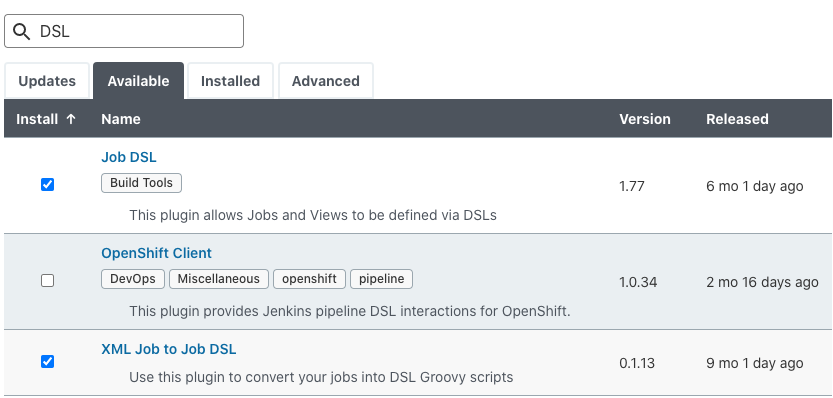
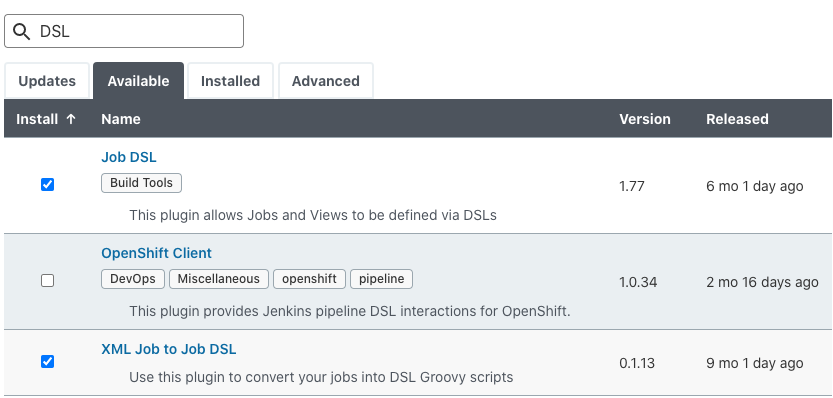
5.2.1 安装插件
- job DSL
- 用于扩展,可以通过插件自带的dsl方法来完成一些的操作。
- XML job to Job DSL
- 将一个项目转换成DSL格式
5.2.2 资源文件
-
DSL 语法
- https://jenkinsci.github.io/job-dsl-plugin/#path/pipelinejob
-
DSL转换XML
-
http://job-dsl.herokuapp.com/
5.2.3 使用DSL
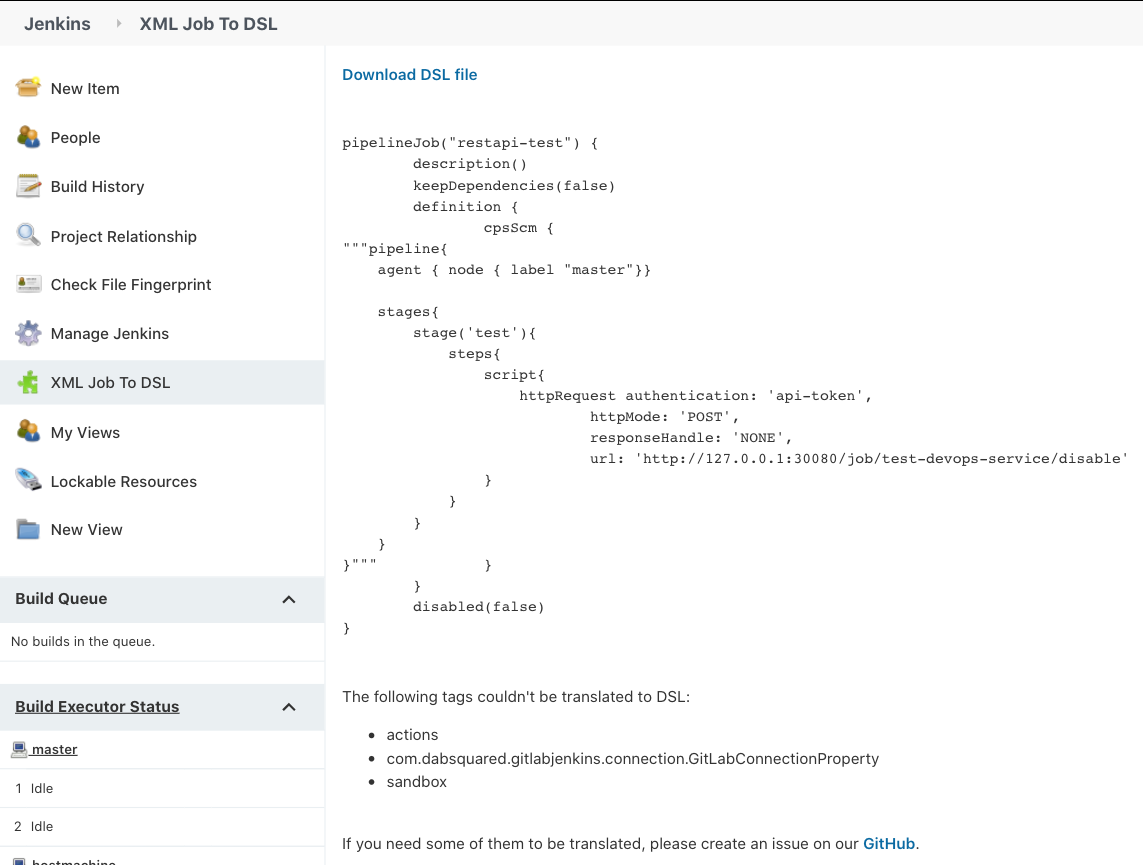
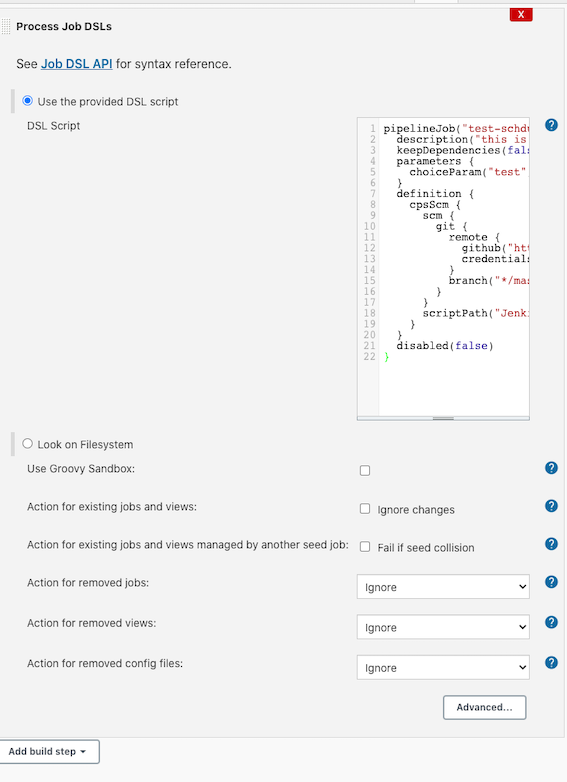
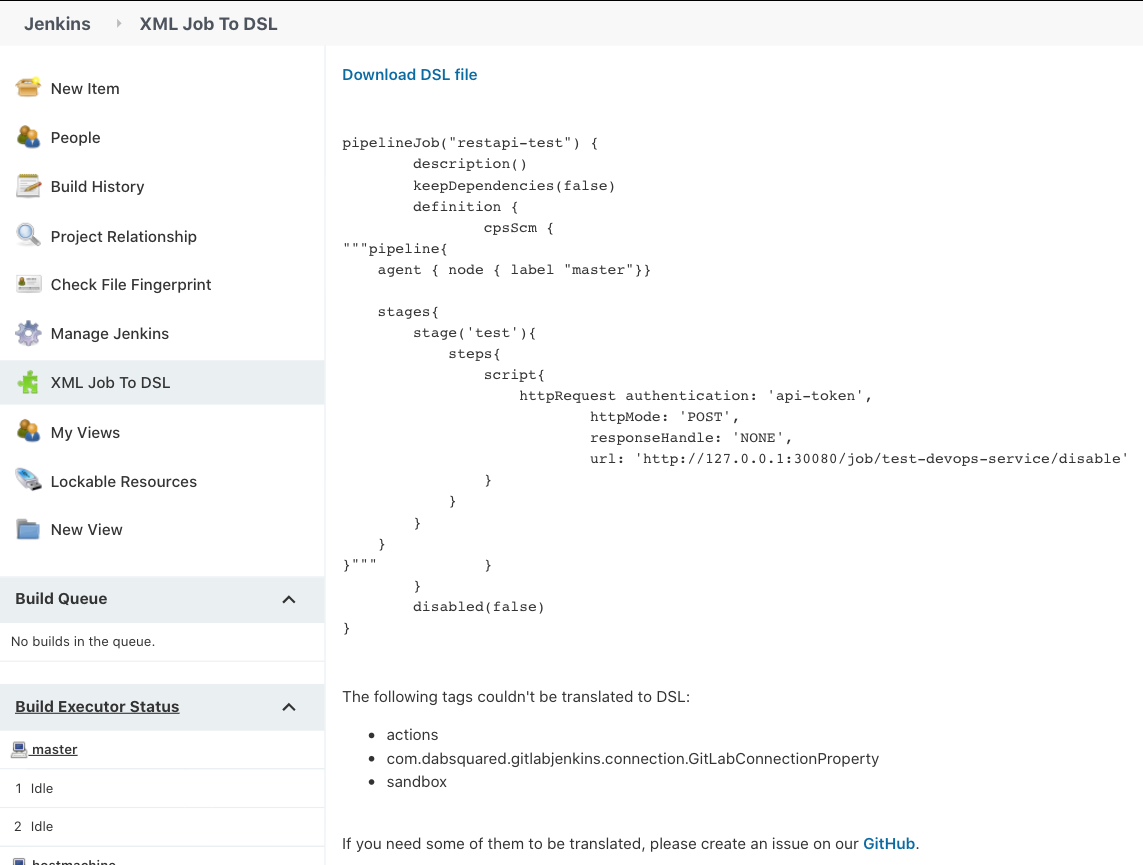
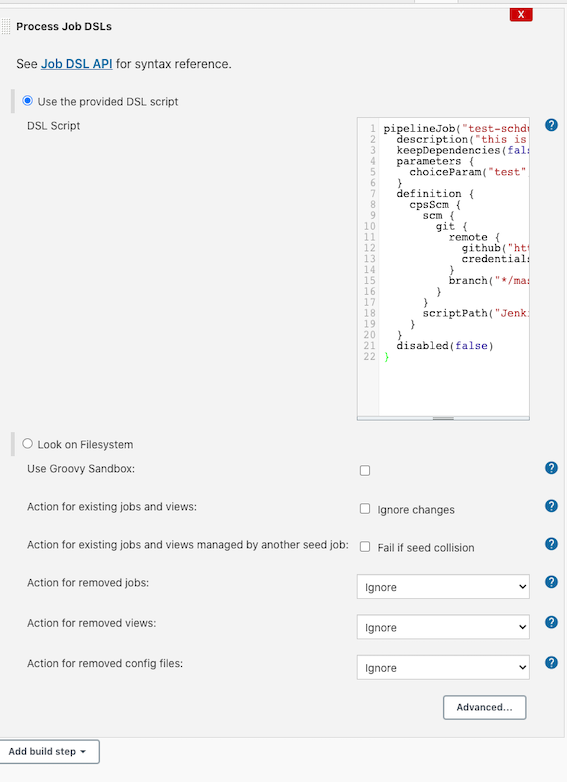
通过XML Job TO dsl 生成DSL语句
Example
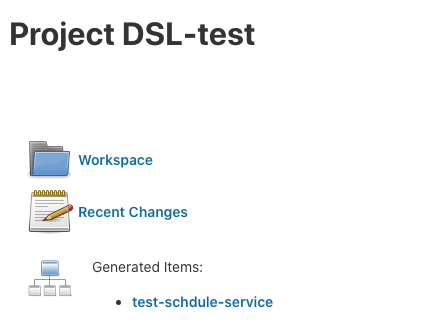
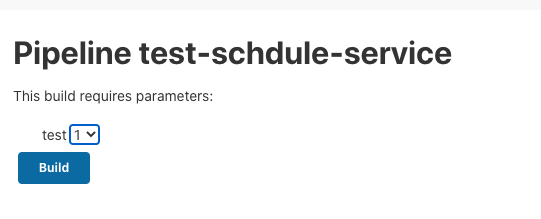
pipelineJob("test-schdule-service") {
  description("this is my first job")
  keepDependencies(false)
  parameters {
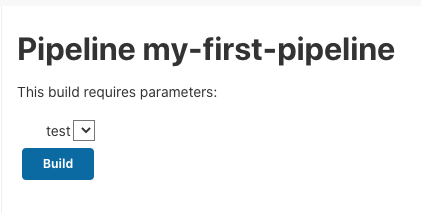
    choiceParam("test", [1, 2, 3], "")
  }
  definition {
    cpsScm {
      scm {
        git {
          remote {
            github("https://gitlab.com/xxx/xxx.git", "https")
            credentials("24982560-17fc-4589-819b-bc5bea89da77")
          }
          branch("*/master")
        }
      }
      scriptPath("Jenkinsfile")
    }
  }
  disabled(false)
}
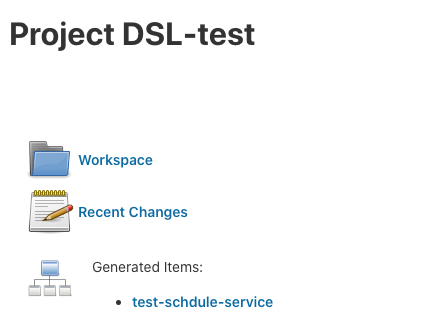
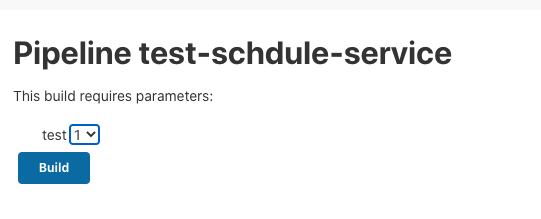
建立Free style job
5.3 Jenkins Core API应用
- https://javadoc.jenkins-ci.org/
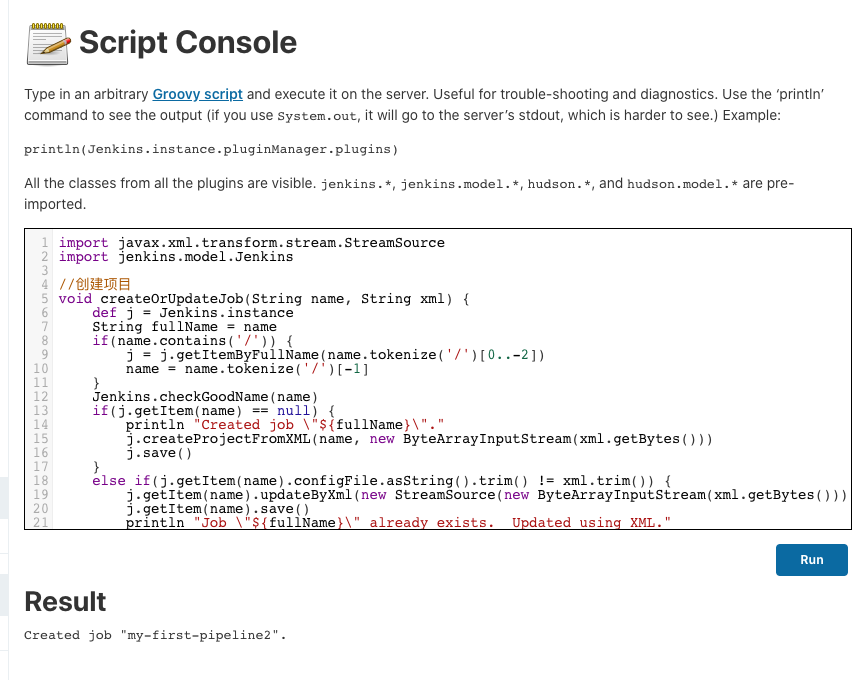
5.3.1 通过Jenkins Core Api创建项目
import javax.xml.transform.stream.StreamSource
import jenkins.model.Jenkins

//创建项目
void createOrUpdateJob(String name, String xml) {
    def j = Jenkins.instance
    String fullName = name
    if(name.contains('/')) {
        j = j.getItemByFullName(name.tokenize('/')[0..-2])
        name = name.tokenize('/')[-1]
    }
    Jenkins.checkGoodName(name)
    if(j.getItem(name) == null) {
        println "Created job \"${fullName}\"."
        j.createProjectFromXML(name, new ByteArrayInputStream(xml.getBytes()))
        j.save()
    }
    else if(j.getItem(name).configFile.asString().trim() != xml.trim()) {
        j.getItem(name).updateByXml(new StreamSource(new ByteArrayInputStream(xml.getBytes())))
        j.getItem(name).save()
        println "Job \"${fullName}\" already exists.  Updated using XML."
    }
    else {
        println "Nothing changed.  Job \"${fullName}\" already exists."
    }
}

try {
    //just by trying to access properties should throw an exception
    // itemName == null
    // xmlData == null
    // isPropertiesSet = true
} catch(MissingPropertyException e) {
    println 'ERROR Can\'t create job.'
    println 'ERROR Missing properties: itemName, xmlData'
    return
}

String xmlData = """<!-- 1. test-schdule-service -->
<flow-definition>
    <actions></actions>
    <description>this is my first job</description>
    <keepDependencies>false</keepDependencies>
    <properties>
        <hudson.model.ParametersDefinitionProperty>
            <parameterDefinitions>
                <hudson.model.ChoiceParameterDefinition>
                    <choices class='java.util.Arrays$ArrayList'>
                        <a class='string-array'>
                            <string>1</string>
                            <string>2</string>
                            <string>3</string>
                        </a>
                    </choices>
                    <name>test</name>
                    <description></description>
                </hudson.model.ChoiceParameterDefinition>
            </parameterDefinitions>
        </hudson.model.ParametersDefinitionProperty>
        <com.coravy.hudson.plugins.github.GithubProjectProperty>
            <projectUrl>https://github.com/https://gitlab.com/xxx/xxx.git/</projectUrl>
        </com.coravy.hudson.plugins.github.GithubProjectProperty>
    </properties>
    <triggers></triggers>
    <definition class='org.jenkinsci.plugins.workflow.cps.CpsScmFlowDefinition'>
        <scriptPath>Jenkinsfile</scriptPath>
        <lightweight>false</lightweight>
        <scm class='hudson.plugins.git.GitSCM'>
            <userRemoteConfigs>
                <hudson.plugins.git.UserRemoteConfig>
                    <url>https://github.com/https://gitlab.com/xxx/xxx.git.git</url>
                    <credentialsId>24982560-17fc-4589-819b-bc5bea89da77</credentialsId>
                </hudson.plugins.git.UserRemoteConfig>
            </userRemoteConfigs>
            <branches>
                <hudson.plugins.git.BranchSpec>
                    <name>*/master</name>
                </hudson.plugins.git.BranchSpec>
            </branches>
            <configVersion>2</configVersion>
            <doGenerateSubmoduleConfigurations>false</doGenerateSubmoduleConfigurations>
            <gitTool>Default</gitTool>
            <browser class='hudson.plugins.git.browser.GithubWeb'>
                <url>https://github.com/https://gitlab.com/xxx/xxx.git/</url>
            </browser>
        </scm>
    </definition>
    <disabled>false</disabled>
</flow-definition>
"""
String itemName = "my-first-pipeline"

createOrUpdateJob(itemName, xmlData)
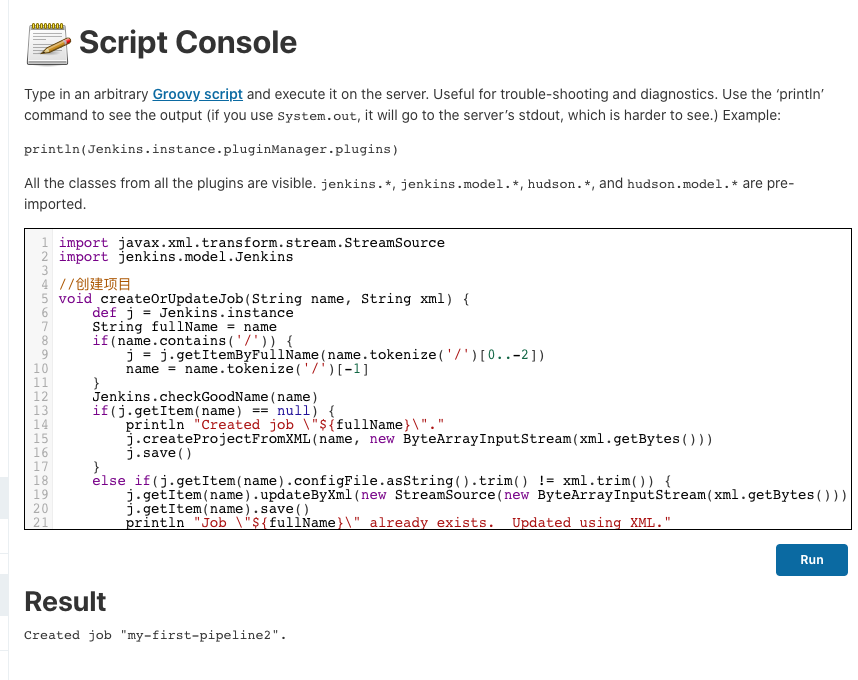
5.3.2 通过Jenkins Script Console运行