

cluster模式
去中心化的集群方案,支持在线数据迁移、节点扩缩容,内置哨兵自动恢复
哨兵模式
只有主节点对外提供服务,支持并发不高,还需要额外部署至少3台哨兵节点辅助
codis模式
中心化的集群方案,proxy完成请求的转发,组件过多,集群方案复杂,但是可以在线扩容

Redis cluster 与codis对比
| codis | redis cluster | |
| 集群模式 | 中心化 | 无中心化 |
| 使用方式 | 通过proxy访问 | 使用cluster客户端直连redis,内置路由规则 |
| 性能 | 有性能损耗 | 高 |
| 数据库数量 | 多个 | 1个 |
| pipeline | 支持 | 仅支持单节点Pipeline,不支持跨节点 |
| 在线水平扩容 | 支持 | 支持 |
| redis版本 | 仅支持3.2.8,不支持升级 | 支持升级 |
| 可维护性 | 组件较多,部署复杂 | 运维简单,官方持续维护 |
| 自动恢复 | 基于redis哨兵实现 | 内置哨兵逻辑,无需额外部署 |
一、Cluster简介
1、3.0版本正式推出,解决单机内存,并发,流量等瓶颈
2、Redis Cluster的核心目标是实现高可用性和水平扩展性
3、一般的分布式方案设计层
-
client层:分区逻辑可控,但是需要自己处理数据路由,高可用,故障转移问题
-
代理层:简化客户端分布式逻辑,但是加重架构部署复杂和性能损耗
-
Server层:数据库自己实现分布式(redis-cluster,tidb,ob)
1.1 数据分布hash
1.1.1 数据分区方案
分布式数据库解决问题,把数据集按照分区规则划分到不同节点上
常见顺序分区和hash分区,Redis采用hash分区
hash分区特点
-
离散度好
-
数据分布式与业务无关
-
无顺序访问
1.1.2 hash分区规则
哈希分区规则有以下几种:
-
节点取余分区
-
一致性hash分区
-
虚拟槽分区
节点取余分区
根据用户ID和节点数量N,hash(key)%N方式计算出hash值,应用
优点: 实现简单,数据映射稳定
缺点: 需要提前规划容量,节点扩缩容则需要重新计算迁移数据
翻倍扩容迁移约 50%数据
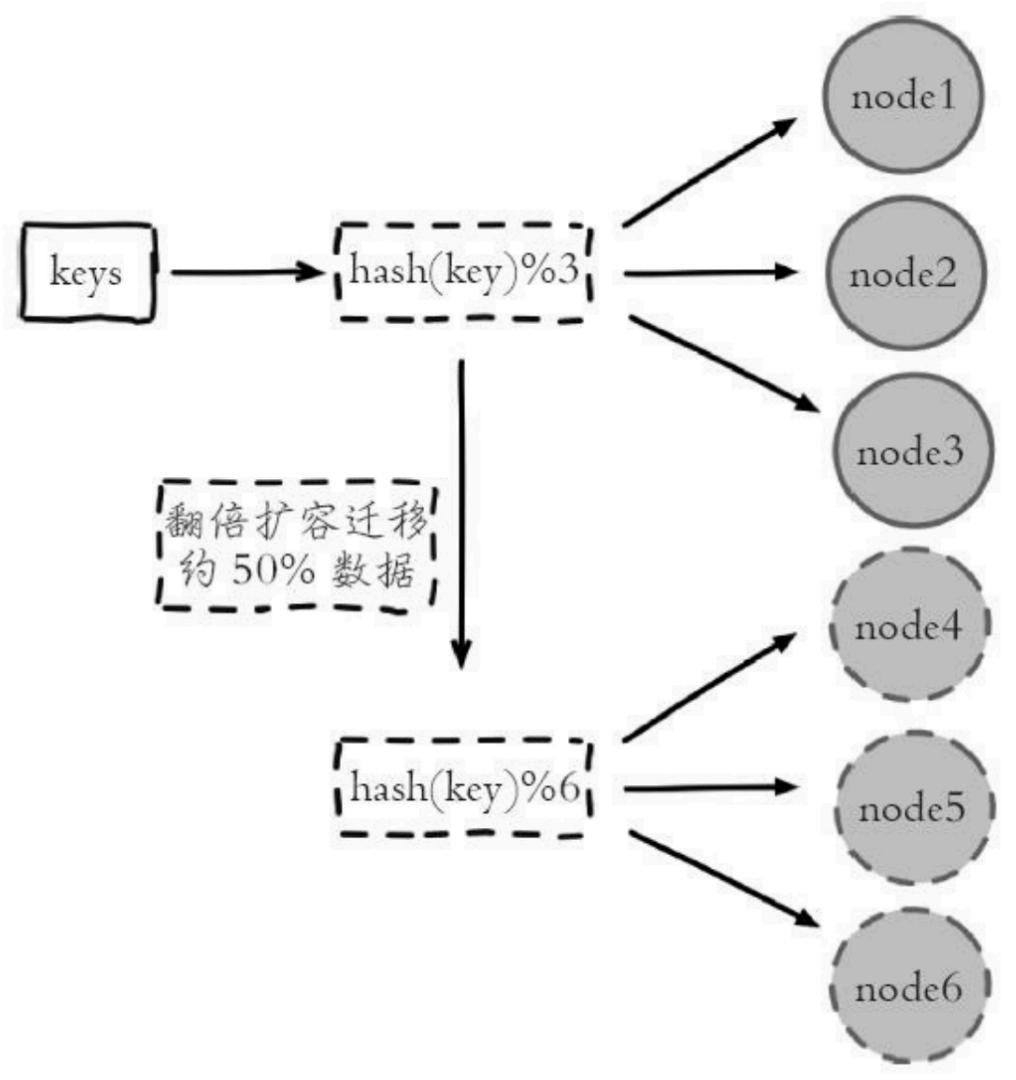
一致性hash分区
实现思路:每个node分配一个token,范围在 $0 { \sim } 2 { \stackrel { \sim } { \ } 3 } 2$ ,构成hash环,根据key计算hash值,在顺指针周到第一个大于该hash值的token节点
优点:加入删除节点仅影响hash环相邻节点。
缺点:
- 加减节点影响hash环部分数据无法命中,需要手动或者忽略数据
- 不适合少量节点,影响太大
- 增减节点加一倍或者减一半能保证数据负载均衡
均衡性:也有人把它定义为平衡性,是指哈希的结果能够尽可能分布到所有的节点中去,这样可以有效的利用每个节点上的资源。
单调性:当节点数量变化时哈希的结果应尽可能的保护已分配的内容不会被重新分派到新的节点。
分散性和负载:这两个其实是差不多的意思,就是要求一致性哈希算法对 key 哈希应尽可能的避免重复。
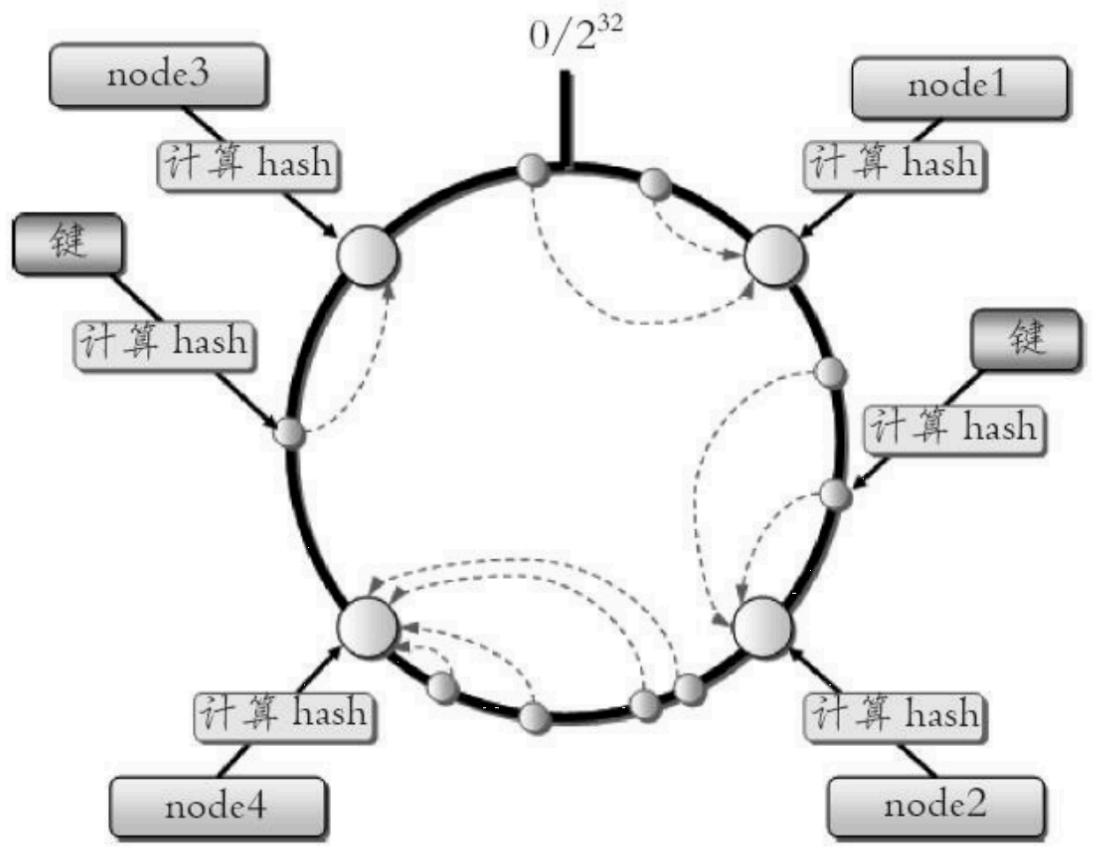

一致性哈希数据分布
虚拟槽分区
简介:
-
基于 一致性hash优化
-
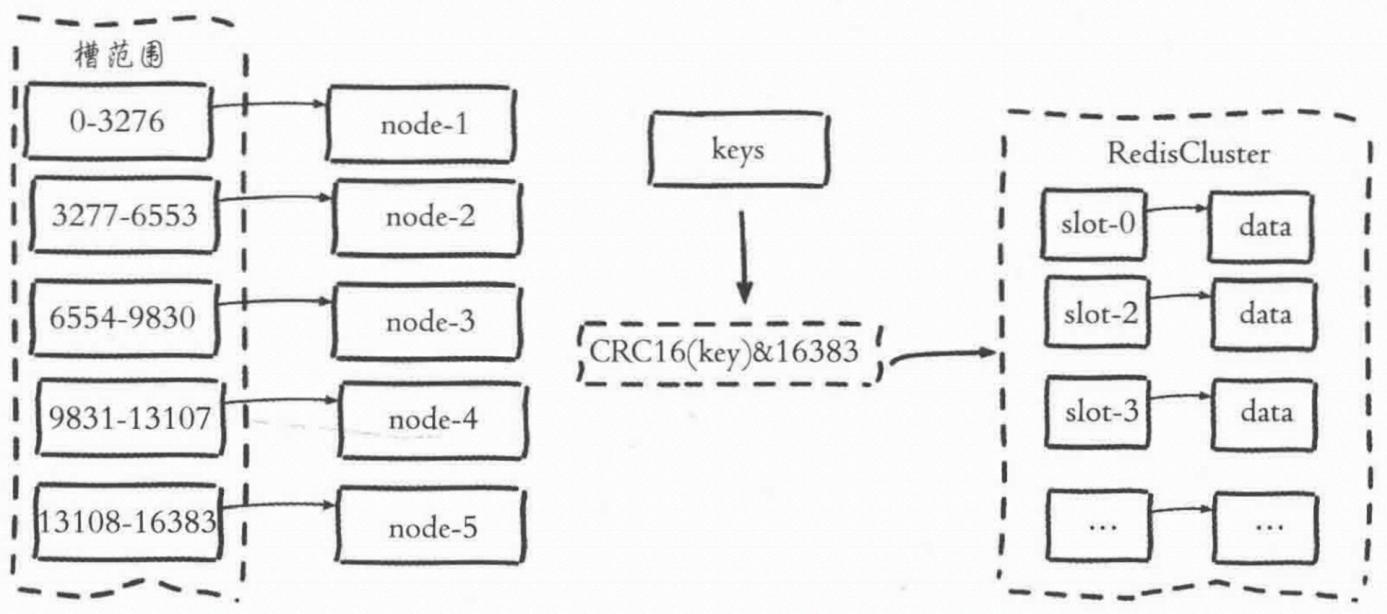
把所有数据映射到一个固定范围的整数集合,定义为slots,为迁移和管理的基本单位
-
Redis 0~16383,五个节点每个大约3276 slot
1.2 Redis数据分区
采用虚拟slot分区,计算共识 slot ${ \bf \Phi } _ { \cdot } = { \bf \Phi } $ CRC16(key)&16384
每个节点负责维护一部分槽
Redis slot特点:
1.简化扩缩容难度
2.仅维护slot和节点及key的映射查询即可
3.不需要客户端或者代理服务
功能限制:
1.key批量操作有限:mset or mget,以为不同slot的key在多个节点不支持
2.事务操作有限:多个节点涉及分布式事务
3.大key支持不好:一个大hash仅能分配到一个slot
4.集群仅使用db0
5.不支持级联复制
为什么是16384个slot?
Normal heartbeat packets carry the full configuration of a node, that can be replaced
in an idempotent way with the old in order to update an old config. This means they
contain the slots configuration for a node, in raw form, that uses 2k of space with16k
slots, but would use a prohibitive 8k of space using 65k slots.
At the same time it is unlikely that Redis Cluster would scale to more than 1000 mater
nodes because of other design tradeoffs.
So 16k was in the right range to ensure enough slots per master with a max of 1000
maters, but a small enough number to propagate the slot configuration as a raw bitmap
easily. Note that in small clusters the bitmap would be hard to compress because when N
is small the bitmap would have slots/N bits set that is a large percentage of bits set.
1. 正常的心跳数据包携带节点的完整配置,它能以幂等方式来更新配置。如果采用 16384 个插槽,占空间 2KB
(16384/8);如果采用 65536 个插槽,占空间 8KB (65536/8)。
2. Redis Cluster 不太可能扩展到超过 1000 个主节点,太多可能导致网络拥堵。
3. 槽位越小,节点少的情况下,压缩率高
二、Redis Cluster部署
2.1 redis-cli部署
2.1.1 命令说明
redis-cli --cluster help

Cluster Manager Commands:
  create host1:port1 ... hostN:portN   # 创建集群
  --cluster-replicas <arg>              # 从节点(副本)个数

  check host:port                       # 检查集群状态
  --cluster-search-multiple-owners      # 检查是否有槽同时被分配给了多个节点

  info host:port                        # 查看集群详细状态

  fix host:port                         # 修复集群
  --cluster-search-multiple-owners      # 修复槽的重复分配问题

  reshard host:port                     # 对集群进行 slot 迁移、重新分配槽
  --cluster-from <arg>                  # 源节点 ID(多个用逗号分隔,可写 all 代表所有节点)
  --cluster-to <arg>                    # 目标节点 ID(只能一个)
  --cluster-slots <arg>                 # 需要迁移的槽数量
  --cluster-yes                         # 自动确认迁移,无需手动输入 yes
  --cluster-timeout <arg>               # 设置 migrate 命令超时时间
  --cluster-pipeline <arg>              # cluster getkeysinslot 一次取多少 key,默认 10
  --cluster-replace                     # 迁移时直接覆盖目标节点相同 key

  rebalance host:port                   # 自动平衡集群各节点的 slot 数量
  --cluster-threshold <arg>             # 迁移阈值,超过才触发均衡
  --cluster-use-empty-masters           # 允许使用空的主节点参与均衡

  add-node new_host:new_port existing_host:existing_port  # 添加节点到集群
  --cluster-slave                         # 以从节点身份加入
  --cluster-master-id <arg>               # 指定归属的主节点 ID

  del-node host:port node_id             # 删除节点(清空槽后才能删除)

  call host:port command arg arg .. arg  # 在集群所有节点执行相同命令

  set-timeout host:port milliseconds     # 设置集群节点心跳超时时间

  import host:port                       # 从外部 Redis 导入数据到集群
  --cluster-copy                        # 拷贝数据(不删除源)
  --cluster-replace                     # 替换冲突 key
   --cluster-weight <node1=w1...nodeN=wN>        #指定集群节点的权重
  --cluster-use-empty-masters                   #设置可以让没有分配slot的主节点参与,默认不允许
  --cluster-timeout <arg>                       #设置migrate命令的超时时间
  --cluster-simulate                            #模拟rebalance操作,不会真正执行迁移操作
  --cluster-pipeline <arg>                      #定义cluster getkeysinslot命令一次取出的key数量,默认值为10
  --cluster-threshold <arg>                     #迁移的slot阈值超过threshold,执行rebalance操作
  --cluster-replace                             #是否直接replace到目标节点

add-node new_host:new_port existing_host:existing_port  #添加节点,把新节点加入到指定的集群,默认添加主节点
  --cluster-slave                                #新节点作为从节点,默认随机一个主节点
  --cluster-master-id <arg>                      #给新节点指定主节点

del-node host:port node_id                       #删除给定的一个节点,成功后关闭该节点服务

call host:port command arg arg .. arg            #在集群的所有节点执行相关命令

set-timeout host:port milliseconds               #设置cluster-node-timeout

import host:port                                 #将外部redis数据导入集群
  --cluster-from <arg>                           #将指定实例的数据导入到集群
  --cluster-copy                                 #migrate时指定copy
  --cluster-replace                              #migrate时指定replace

help

For check, fix, reshard, del-node, set-timeout you can specify the host and port of any working node in the cluster.
2.1.2 集群部署
端口分配:
6510 -> 6520
6511 -> 6521
6512 -> 6522
启动6个redis节点
redis部署安装
(1)目录初始化
mkdir -p /data/redis/{6510,6511,6512,6520,6521,6522}
cp -r /usr/local/redis/bin/ /data/redis/6510/
cp -r /usr/local/redis/bin/ /data/redis/6511/
cp -r /usr/local/redis/bin/ /data/redis/6512/
cp -r /usr/local/redis/bin/ /data/redis/6520/
cp -r /usr/local/redis/bin/ /data/redis/6521/
cp -r /usr/local/redis/bin/ /data/redis/6522/
(2)生成配置文件
cat > /data/redis/6510/redis_6510.conf <<EOF
daemonize yes
timeout 0
databases 16
dir "/data/redis/6510"
slowlog-log-slower-than 10000
slowlog-max-len 128
hz 10
port 6510
maxmemory 100mb
appendonly yes
appendfsync everysec
appendfilename "appendonly-6510.aof"
dbfilename "dump-6510.rdb"
file "/data/redis/6510/redis_6510.log"
pidfile /data/redis/6510/redis_6510.pid
protected-mode no
requirepass ""
masterauth ""
cluster-enabled yes
cluster-config-file /data/redis/6510/node_6510.conf
cluster-node-timeout 15000
cluster-replica-validity-factor 10
cluster-migration-barrier 1
cluster require-full-coverage no
EOF

cd /data/redis/6510/
cp redis_6510.conf /data/redis/6511/redis_6511.conf
cp redis_6510.conf /data/redis/6512/redis_6512.conf
cp redis_6510.conf /data/redis/6520/redis_6520.conf
cp redis_6510.conf /data/redis/6521/redis_6521.conf
cp redis_6510.conf /data/redis/6522/redis_6522.conf
sed -i 's/6510/6511/g' /data/redis/6511/redis_6511.conf
sed -i 's/6510/6512/g' /data/redis/6512/redis_6512.conf
sed -i 's/6510/6520/g' /data/redis/6520/redis_6520.conf
sed -i 's/6510/6521/g' /data/redis/6521/redis_6521.conf
sed -i 's/6510/6522/g' /data/redis/6522/redis_6522.conf
启动
/data/redis/6510/bin/redis-server /data/redis/6510/redis_6510.conf
/data/redis/6511/bin/redis-server /data/redis/6511/redis_6511.conf
/data/redis/6512/bin/redis-server /data/redis/6512/redis_6512.conf
/data/redis/6520/bin/redis-server /data/redis/6520/redis_6520.conf
/data/redis/6521/bin/redis-server /data/redis/6521/redis_6521.conf
/data/redis/6522/bin/redis-server /data/redis/6522/redis_6522.conf
查看
ps -ef |grep cluster
root 33547 1 0 13:12 ? 00:00:00 /data/redis/6510/bin/redis-server
*:6510 [cluster]
root 33808 1 0 13:14 ? 00:00:00 /data/redis/6511/bin/redis-server
*:6511 [cluster]
root 33991 1 0 13:14 ? 00:00:00 /data/redis/6512/bin/redis-server
*:6512 [cluster]
root 34102 1 0 13:15 ? 00:00:00 /data/redis/6520/bin/redis-server
*:6520 [cluster]
root 34193 1 0 13:15 ? 00:00:00 /data/redis/6521/bin/redis-server
*:6521 [cluster]
root 34246 1 0 13:16 ? 00:00:00 /data/redis/6522/bin/redis-server
*:6522 [cluster]
cluster创建
#redis-trib.rb分装到redis-cli命令里面
redis-cli --cluster help
redis-cli --cluster create 192.168.9.78:6510 192.168.9.78:6511 192.168.9.78:6512
192.168.9.78:6520 192.168.9.78:6521 192.168.9.78:6522 --cluster-replicas 1 #
cluster-replicas:指定的副本数,即从节点

[root@OPS-9-78 6520]# redis-cli --cluster create 192.168.9.78:6510 192.168.9.78:6511
192.168.9.78:6512 192.168.9.78:6520 192.168.9.78:6521 192.168.9.78:6522 --clusterreplicas 1
>>> Performing hash slots allocation on 6 nodes...
Master[0] -> Slots 0 - 5460
Master[1] -> Slots 5461 - 10922
Master[2] -> Slots 10923 - 16383
Adding replica 192.168.9.78:6521 to 192.168.9.78:6510
Adding replica 192.168.9.78:6522 to 192.168.9.78:6511
Adding replica 192.168.9.78:6520 to 192.168.9.78:6512
>>> Trying to optimize slaves allocation for anti-affinity
[WARNING] Some slaves are in the same host as their master
M: 69bc68c2ef584fcd3aadc645cdad2e313128bd44 192.168.9.78:6510
 slots:[0-5460] (5461 slots) master
M: ed7c2f9b8118a7d8e1a1e4bab9258d0eeae3cad9 192.168.9.78:6511
 slots:[5461-10922] (5462 slots) master
M: 34493942ff587b203aa4649a311e616cb60c9052 192.168.9.78:6512
 slots:[10923-16383] (5461 slots) master
S: f899f49487288251fcec21c738eb1e581ea05da4 192.168.9.78:6520
 replicates ed7c2f9b8118a7d8e1a1e4bab9258d0eeae3cad9
S: e11556f28fee3dd710e451e188728a2f5ba6f65b 192.168.9.78:6521
 replicates 34493942ff587b203aa4649a311e616cb60c9052
S: e5663e0168079eb26064e1d1bfc720506066962e 192.168.9.78:6522
 replicates 69bc68c2ef584fcd3aadc645cdad2e313128bd44
Can I set the above configuration? (type 'yes' to accept): yes
>>> Nodes configuration updated
>>> Assign a different config epoch to each node
>>> Sending CLUSTER MEET messages to join the cluster
Waiting for the cluster to join
.
>>> Performing Cluster Check (using node 192.168.9.78:6510)

M: 69bc68c2ef584fcd3aadc645cdad2e313128bd44 192.168.9.78:6510
 slots:[0-5460] (5461 slots) master
 1 additional replica(s)
M: 34493942ff587b203aa4649a311e616cb60c9052 192.168.9.78:6512
 slots:[10923-16383] (5461 slots) master
 1 additional replica(s)
S: e5663e0168079eb26064e1d1bfc720506066962e 192.168.9.78:6522
 slots: (0 slots) slave
 replicates 69bc68c2ef584fcd3aadc645cdad2e313128bd44
S: e11556f28fee3dd710e451e188728a2f5ba6f65b 192.168.9.78:6521
 slots: (0 slots) slave
 replicates 34493942ff587b203aa4649a311e616cb60c9052
S: f899f49487288251fcec21c738eb1e581ea05da4 192.168.9.78:6520
 slots: (0 slots) slave
 replicates ed7c2f9b8118a7d8e1a1e4bab9258d0eeae3cad9
M: ed7c2f9b8118a7d8e1a1e4bab9258d0eeae3cad9 192.168.9.78:6511
 slots:[5461-10922] (5462 slots) master
 1 additional replica(s)
[OK] All nodes agree about slots configuration.
>>> Check for open slots...
>>> Check slots coverage...
[OK] All 16384 slots covered.
集群状态确认
[root@OPS-9-78 6520]# redis-cli -c -p 6510
127.0.0.1:6510> cluster info #打印集群的信息
cluster_state:ok #ok状态表示集群可以正常接受查询请求
cluster_slots_assigned:16384 #已分配到集群节点的哈希槽数量
cluster_slots_ok:16384
cluster_slots_pfail:0
cluster_slots_fail:0
cluster_known_nodes:6 #集群中节点数量
cluster_size:3 #至少包含一个slot且能够提供服务的master节点数量
2.1.3 集群节点扩容
新加入节点:主:6530 ,从:6531
#1、启动redis6530/6531两个实例
mkdir -p /data/redis/{6530,6531}
cp -r /usr/local/redis/bin/ /data/redis/6530/
cp -r /usr/local/redis/bin/ /data/redis/6531/
cd /data/redis/6510/
cp redis_6510.conf /data/redis/6530/redis_6530.conf
cp redis_6510.conf /data/redis/6531/redis_6531.conf
sed -i 's/6510/6530/g' /data/redis/6530/redis_6530.conf
sed -i 's/6510/6531/g' /data/redis/6531/redis_6531.conf
/data/redis/6530/bin/redis-server /data/redis/6530/redis_6530.conf
/data/redis/6531/bin/redis-server /data/redis/6531/redis_6531.conf
-- 启动完成后,6530 和 6531 两个节点还处于游离状态,还未加入redis集群中!

#2、加入主节点到集群,并进行slot分配
##(1)新增master节点 192.169.9.78:6530
$ redis-cli --cluster add-node 127.0.0.1:6530 127.0.0.1:6510 #6530表示要加入的节点,
6510表示集群中任意一个节点,用来标识这个集群
##(2)集群重新sharding
$ redis-cli --cluster reshard 127.0.0.1:6530
How many slots do you want to move (from 1 to 16384)? 4095
What is the receiving node ID? a4cb8f370148cbc3f67ea5b69d839f6008904804 #6530的nodeid
Please enter all the source node IDs.
 Type 'all' to use all the nodes as source nodes for the hash slots.
 Type 'done' once you entered all the source nodes IDs.
Source node #1: all
##(3)验证集群的slot分配
192.168.9.78:6510> cluster nodes
a4cb8f370148cbc3f67ea5b69d839f6008904804 127.0.0.1:6530@16530 master - 0 1686116935075
7 connected 0-1363 5461-6826 10923-12286
交互内容:
#第一次交互:需要迁移多少个槽
How many slots do you want to move (from 1 to 16384)?
#第二次交互:接受 slot 槽的节点ID
What is the receiving node ID?
#第三次交互:哪些节点需要导出
all 为自动分配,第二种方式为手动分配。
#第四次交互:确认信息
Do you want to proceed with the proposed reshard plan (yes/no)?
yes
# 3、从节点直接加入集群,指定master即可
## 新增slave节点 6511
$ redis-cli --cluster add-node 127.0.0.1:6531 127.0.0.1:6510 --cluster-slave --
cluster-master-id a4cb8f370148cbc3f67ea5b69d839f6008904804
-- 8231为要加入的节点。cluster-slave代表作为slave加入,cluster-master-id 后面加master(6530)
的node-id
# 4、reshard 脚本命令
redis-cli --cluster reshard 127.0.0.1:6510 --cluster-from {node_id} --cluster-to {接受
slot_id} --cluster-slots 2000 --cluster-yes
说明:
  --cluster 后的host:port 指定集群的任意一节点进行迁移slot,重新分slots
  --cluster-from:表示slot目前所在的节点的node ID,多个ID用逗号分隔(nodeId通过 clusters nodes
查看,第一列为nodeId)
  --cluster-to:表示需要新分配节点的node ID(每次只能分配一个)
  --cluster-slots:分配的 slot 数量
  --cluster-yes:指示群集管理器对命令的提示自动回答“是”,允许它以非交互模式运行
2.1.4 集群节点缩容
#缩容节点
master节点:6530
slave节点:6531
#1.清空master的slot
redis-cli --cluster reshard 127.0.0.1:6510 --cluster-from
a4cb8f370148cbc3f67ea5b69d839f6008904804 --cluster-to
34493942ff587b203aa4649a311e616cb60c9052 ed7c2f9b8118a7d8e1a1e4bab9258d0eeae3cad9
69bc68c2ef584fcd3aadc645cdad2e313128bd44 --cluster-slots 4095 --cluster-yes
#2. 检查节点是否全部迁移走
192.168.9.78:6510> cluster nodes
a4cb8f370148cbc3f67ea5b69d839f6008904804 127.0.0.1:6530@16530 master - 0 1686140461000
7 connected
#3.删除从节点
redis-cli --cluster del-node 127.0.0.1:6510 caf7434be9150a3599d1d2e365ac0eab319b835c
>>> Removing node caf7434be9150a3599d1d2e365ac0eab319b835c from cluster 127.0.0.1:6510
>>> Sending CLUSTER FORGET messages to the cluster...
>>> Sending CLUSTER RESET SOFT to the deleted node.
#4.删除主节点
redis-cli --cluster del-node 127.0.0.1:6510 a4cb8f370148cbc3f67ea5b69d839f6008904804
#5.平衡节点
redis-cli --cluster rebalance 127.0.0.1:6510
说明:
1)check or rebalance 后面跟的是集群中任意一个节点即可
2)当集群每个节点的 slot 槽为不均衡后,使用 rebalance 重新平衡。
3)使用后每个 master 的 slot 数量就会再次平衡,在 2% 阈值范围内,使用命令也不会平衡,会进行如下提示:
*** No rebalancing needed! All nodes are within the 2.00% threshold.
2.2 cluster相关配置
1. cluster-enabled #redis集群开关
2.cluster-config-file #redis集群配置文件,每个节点都有一个集群配置文件
4.cluster-node-timeout #集群节点互联超时毫秒数,默认为15000毫秒
5. cluster-slave-validity-factor #判断slave节点与master节点断线的时间是否过长
6. cluster-migration-barrier #master节点需要的最小slave节点数,只有达到这个数,master节点
失败时,slave节点才能迁移到其他master节点上
7.cluster-require-full-coverage #设置为no,可以在slot没有全部分配的时候提供服务