

一、项目代码分析
其中访问流量走向为:
- 1)用户访问demo.test.com/,调用demo.test.com/receiveapi/api/generatePassword接口通过路由到网关服务
- 2)demo-receive通过demo-eureka查询服务列表,demo-eureka返回demo-handler地址给demo-receive
- 3)demo-receive转发请求给demo-handler
- 4)demo-handler返回随机密码给demo-receive
- 5)demo-receive最终返回数据给浏览器
  用户->>前端: 点击"生成密码"按钮
  前端->>Ingress: GET /receiveapi/api/generatePassword
  Ingress->>网关: 路由请求
  网关->>后端: 转发请求
  后端->>网关: 返回生成的密码
  网关->>Ingress: 返回响应
  Ingress->>前端: 返回密码数据
  前端->>用户: 更新界面显示密码
下面从代码的角度来分析:
1、当用户访问demo.test.com/后,点击【生成密码】后,触发方法函数generatePassword,调用后端接口/receiveapi/api/generatePassword,向后端demo-receive发起 HTTP 请求获取生成的密码
[root@k8s-node01 ~]# cat springcloud/demo-ui/src/components/HelloWorld.vue
<script setup>
import { ref } from 'vue'
import axios from 'axios'

defineProps({
  msg: String,
})

const password = ref()
const generatePassword = () => {
  // 向给定ID的用户发起请求
  axios.get('/receiveapi/api/generatePassword')
    .then(function (response) {
      // 处理成功情况
      password.value = response.data
    })
    .catch(function (error) {
      // 处理错误情况
      window.alert("请求失败:", error)
    })
}
</script>

<template>
  <h1>{{ msg }}</h1>

  <div class="card">
    <button type="button" @click="generatePassword()">生成密码</button>
  </div>

  <p>
    {{password}}
  </p>
</template>

<style scoped>
.read-the-docs {
  color: #888;
}
</style>
2、demo-receive处理 /api/generatePassword 的 GET 请求,通过 RestTemplate 调用名为 handler 的后端服务的 /api/generate 接口,获取生成的密码
[root@k8s-node01 ~]# cat springcloud/demo-receive/src/main/java/com/receive/controller/ProcessController.java
package com.receive.controller;

import org.springframework.beans.factory.annotation.Autowired;
import org.springframework.beans.factory.annotation.Value;
import org.springframework.web.bind.annotation.GetMapping;
import org.springframework.web.bind.annotation.RequestMapping;
import org.springframework.web.bind.annotation.RestController;
import org.springframework.web.client.RestTemplate;

@RestController
@RequestMapping("/api")
public class ProcessController {

    @Autowired
    private RestTemplate restTemplate;

    @GetMapping("/generatePassword")
    public String generateRandomPassword() {
        return restTemplate.getForObject("http://handler/api/generate", String.class);
    }
}
3、demo-receive通过demo-eureka查询服务列表,demo-eureka返回demo-handler地址给demo-receive,demo-receive转发请求给demo-handler
[root@k8s-node01 ~]# cat springcloud/demo-handler/src/main/resources/application-k8s.yml
# server:
#   port: 8080
spring:
  application:
    name: handler
eureka:
  client:
    serviceUrl:
      defaultZone: ${EUREKA_SERVER_ADDRESS}
  instance:
    prefer-ip-address: true
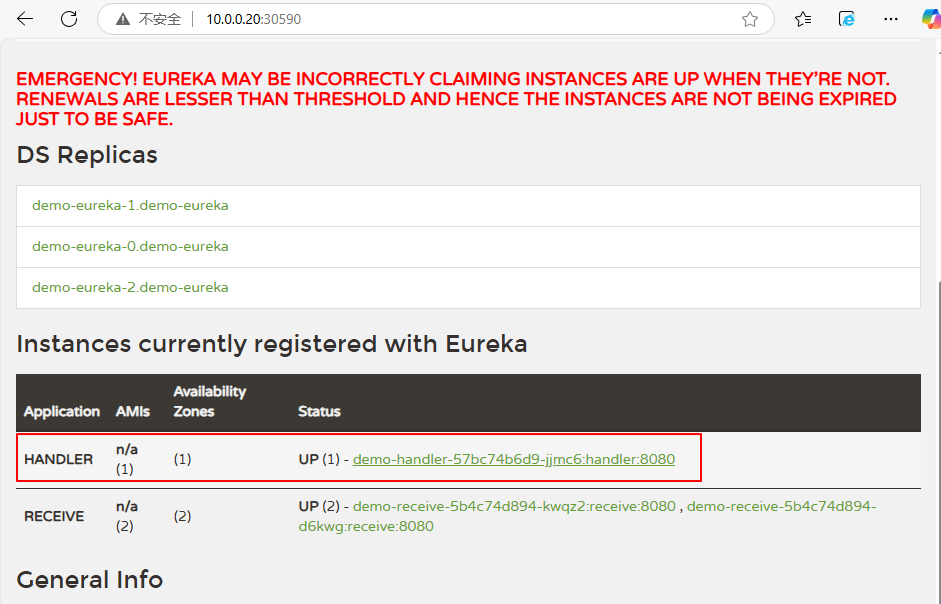
4、demo-handler生成 32 位高强度随机密码并通过REST API 暴露 /api/generate 接口,供demo-receive调用。
[root@k8s-node01 ~]# cat springcloud/demo-handler/src/main/java/com/handler/controller/ProcessController.java
package com.handler.controller;

import org.springframework.web.bind.annotation.GetMapping;
import org.springframework.web.bind.annotation.RequestMapping;
import org.springframework.web.bind.annotation.RestController;

import java.util.Random;
import java.security.SecureRandom;

@RestController
@RequestMapping("/api")
public class ProcessController {
    private static final String CHAR_LOWER = "abcdefghijklmnopqrstuvwxyz";
    private static final String CHAR_UPPER = CHAR_LOWER.toUpperCase();
    private static final String NUMBER = "0123456789";
    private static final String SPECIAL_CHARS = "!@#$%^&*()_+~`|}{[]:;?><,./-=\\";
    @GetMapping("/generate")
    public String generate() {
        String allChars = CHAR_LOWER + CHAR_UPPER + NUMBER + SPECIAL_CHARS;
        SecureRandom random = new SecureRandom();
        StringBuilder password = new StringBuilder(32);
        for (int i = 0; i < 32; i++) {
            int randomIndex = random.nextInt(allChars.length());
            password.append(allChars.charAt(randomIndex));
        }

        return password.toString();
    }
}
5、demo-receive收到demo-handler生成的密码串后返回给demo-ui
[root@k8s-node01 ~]# cat springcloud/demo-receive/src/main/java/com/receive/controller/ProcessController.java
package com.receive.controller;

import org.springframework.beans.factory.annotation.Autowired;
import org.springframework.beans.factory.annotation.Value;
import org.springframework.web.bind.annotation.GetMapping;
import org.springframework.web.bind.annotation.RequestMapping;
import org.springframework.web.bind.annotation.RestController;
import org.springframework.web.client.RestTemplate;

@RestController
@RequestMapping("/api")
public class ProcessController {

    @Autowired
    private RestTemplate restTemplate;

    @GetMapping("/generatePassword")
    public String generateRandomPassword() {
        return restTemplate.getForObject("http://handler/api/generate", String.class);
    }
}
6、demo-ui最终展示在浏览器中
[root@k8s-node01 ~]# cat springcloud/demo-ui/src/components/HelloWorld.vue
<script setup>
import { ref } from 'vue'
import axios from 'axios'

defineProps({
  msg: String,
})

const password = ref()
const generatePassword = () => {
  // 向给定ID的用户发起请求
  axios.get('/receiveapi/api/generatePassword')
    .then(function (response) {
      // 处理成功情况
      password.value = response.data
    })
    .catch(function (error) {
      // 处理错误情况
      window.alert("请求失败:", error)
    })
}
</script>

<template>
  <h1>{{ msg }}</h1>

  <div class="card">
    <button type="button" @click="generatePassword()">生成密码</button>
  </div>

  <p>
    {{password}}
  </p>
</template>

<style scoped>
.read-the-docs {
  color: #888;
}
</style>