
来自AI助手的总结
介绍了Kubernetes中EFK日志方案及ES集群部署配置。

一、前言
Kubernetes 中比较流行的日志收集解决方案是Elasticsearch、Fluentd 和 Kibana (EFK)技术栈,也是官方现在比较推荐的一种方案。
1.1 主要组件功能
1、Elasticsearch(ES):
-
强大的搜索和查询能力:ES是一个分布式搜索和分析引擎,具有高效的搜索和 查询功能。它可以处理大规模的数据,并且支持复杂的查询操作。
-
可伸缩性和高可用性:可通过增加节点来扩展存储和吞吐量,并且自动进行数据分片和副本分配,以确保高可用性和容错性。
-
实时数据分析:实时地索引和分析日志数据,可以快速地提供实时的分析结果和可视化。
2、Fluentd:
- 灵活的数据收集和传输:Fluentd 是一个开源的日志收集器,可以从各种数据源 (如文件、应用程序日志、系统日志等)采集数据,并将其传输到指定的目标。
- 多样的插件生态系统:提供了丰富的插件生态系统,支持与各种数据源和目标的集成,如文件、数据库、消息队列等。数据的收集和导出更加灵活和可扩展。
- 可靠性和容错性:Fluentd 具备高可靠性和容错性,通过缓冲区和重试机制,即使在网络中断或目标不可用的情况下,也能保证数据的可靠传输和持久化。
3、Kibana
-
灵活的数据可视化:Kibana 是一个强大的数据可视化工具,可将日志数据转化为丰富的图表、仪表盘和报表。提供了各种直观易懂的可视化组件,以便快速理解数据趋势和分析结果。
-
实时监控和警报功能:实时监控日志数据,并设置警报规则以及响应动作。让用户可以及时发现并处理异常情况,提高系统的可靠性和稳定性。
-
用户友好的界面:提供了一个直观友好的用户界面,非技术人员也能轻松地使用和定制自己的仪表盘和报表,而无需编写复杂的查询语句和代码。
1.2 EFK组合优点
- 灵活性:EFK 技术栈中的每个组件都具有可定制和可扩展的特点,可以根据实际需 求进行配置和扩展,满足不同环境和场景的需求。
- 实时性:Elasticsearch 和 Fluentd 能够实时处理和传输日志数据,日志的搜索和分析能够尽可能地接近实时。
- 可扩展性:Elasticsearch 是一个分布式存储和搜索引擎,能够水平扩展以应对大规 模的日志数据。Fluentd 和 Kibana 也支持水平扩展,可以根据需要增加节点和实 例,以适应日志数据量的增长。
- 可视化和分析能力:Kibana 提供了强大的可视化和分析工具,用户能够以直观的方 式探索数据、构建仪表盘和生成图表,轻松进行数据分析和故障排查。
- 开源社区支持:EFK 技术栈是开源项目,有庞大的社区支持和活跃的开发者社群, 提供了丰富的插件和文档资源,便于用户学习、使用和解决问题。
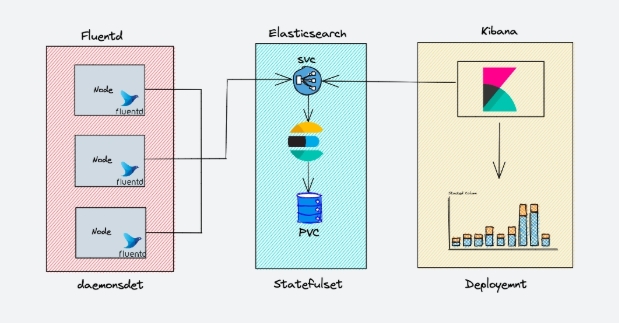
二、ES集群部署配置
2.1 环境准备
在创建 Elasticsearch 集群之前,我们先创建一个命名空间
[root@master01 9]# kubectl create ns logging
2.2 安装 ES 集群
添加 ELastic 的 Helm 仓库:
[root@master01 9]# helm repo add elastic https://helm.elastic.co
[root@master01 9]# helm repo update
首先使用 helm pull 拉取 Chart 并解压:
[root@master01 9]# helm pull elastic/elasticsearch --untar --version 7.17.3
[root@master01 9]# cd elasticsearch
在 Chart 目录下面创建用于 Master 节点安装配置的 values 文件:
## 设置集群名称
clusterName: "elasticsearch"
## 设置节点名称
nodeGroup: "master"

## 设置角色
roles:
  master: "true"
  ingest: "true"
  data: "true"
  remote_cluster_client: "true"
  ml: "true"

# ============镜像配置============
## 指定镜像与镜像版本
image: "registry.cn-hangzhou.aliyuncs.com/github_images1024/elasticsearch"
imageTag: "7.17.3"
imagePullPolicy: "IfNotPresent"

## 副本数
replicas: 3
minimumMasterNodes: 2

# ============资源配置============
## JVM 配置参数
esJavaOpts: "-Xmx1g -Xms1g"
## 部署资源配置(生产环境要设置大些)
resources:
  requests:
    cpu: "2000m"
    memory: "2Gi"
  limits:
    cpu: "2000m"
    memory: "2Gi"
## 数据持久卷配置
persistence:
  enabled: true
## 存储数据大小配置
volumeClaimTemplate:
  storageClassName: nfs-storage
  accessModes: ["ReadWriteOnce"]
  resources:
    requests:
      storage: 30Gi

# 完整配置文件
[root@master01 elasticsearch]# egrep -v  "#|^$" values.yaml
---
clusterName: "elasticsearch"
nodeGroup: "master"
masterService: ""
roles:
  master: "true"
  ingest: "true"
  data: "true"
  remote_cluster_client: "true"
  ml: "true"
replicas: 3
minimumMasterNodes: 2
esMajorVersion: ""
clusterDeprecationIndexing: "false"
esConfig: {}
esJvmOptions: {}
extraEnvs: []
envFrom: []
secretMounts: []
hostAliases: []
image: "registry.cn-hangzhou.aliyuncs.com/github_images1024/elasticsearch"
imageTag: "7.17.3"
imagePullPolicy: "IfNotPresent"
podAnnotations:
  {}
labels: {}
esJavaOpts: "-Xmx1g -Xms1g"
resources:
  requests:
    cpu: "2000m"
    memory: "2Gi"
  limits:
    cpu: "2000m"
    memory: "2Gi"
initResources:
  {}
networkHost: "0.0.0.0"
volumeClaimTemplate:
  storageClassName: nfs-storage
  accessModes: ["ReadWriteOnce"]
  resources:
    requests:
      storage: 30Gi
rbac:
  create: false
  serviceAccountAnnotations: {}
  serviceAccountName: ""
  automountToken: true
podSecurityPolicy:
  create: false
  name: ""
  spec:
    privileged: true
    fsGroup:
      rule: RunAsAny
    runAsUser:
      rule: RunAsAny
    seLinux:
      rule: RunAsAny
    supplementalGroups:
      rule: RunAsAny
    volumes:
      - secret
      - configMap
      - persistentVolumeClaim
      - emptyDir
persistence:
  enabled: true
  labels:
    enabled: false
  annotations: {}
extraVolumes:
  []
extraVolumeMounts:
  []
extraContainers:
  []
extraInitContainers:
  []
priorityClassName: ""
antiAffinityTopologyKey: "kubernetes.io/hostname"
antiAffinity: "hard"
nodeAffinity: {}
podManagementPolicy: "Parallel"
enableServiceLinks: true
protocol: http
httpPort: 9200
transportPort: 9300
service:
  enabled: true
  labels: {}
  labelsHeadless: {}
  type: ClusterIP
  publishNotReadyAddresses: false
  nodePort: ""
  annotations: {}
  httpPortName: http
  transportPortName: transport
  loadBalancerIP: ""
  loadBalancerSourceRanges: []
  externalTrafficPolicy: ""
updateStrategy: RollingUpdate
maxUnavailable: 1
podSecurityContext:
  fsGroup: 1000
  runAsUser: 1000
securityContext:
  capabilities:
    drop:
      - ALL
  runAsNonRoot: true
  runAsUser: 1000
terminationGracePeriod: 120
sysctlVmMaxMapCount: 262144
readinessProbe:
  failureThreshold: 3
  initialDelaySeconds: 10
  periodSeconds: 10
  successThreshold: 3
  timeoutSeconds: 5
clusterHealthCheckParams: "wait_for_status=green&timeout=1s"
schedulerName: ""
imagePullSecrets: []
nodeSelector: {}
tolerations: []
ingress:
  enabled: false
  annotations: {}
  className: "nginx"
  pathtype: ImplementationSpecific
  hosts:
    - host: chart-example.local
      paths:
        - path: /
  tls: []
nameOverride: ""
fullnameOverride: ""
healthNameOverride: ""
lifecycle:
  {}
sysctlInitContainer:
  enabled: true
keystore: []
networkPolicy:
  http:
    enabled: false
  transport:
    enabled: false
tests:
  enabled: true
fsGroup: ""
安装:
#安装master节点
[root@master01 elasticsearch]# helm upgrade --install es7 -f values.yaml --namespace logging .
查看状态:
[root@master01 elasticsearch]# kgp -nlogging -owide
NAME                     READY   STATUS    RESTARTS   AGE    IP               NODE       NOMINATED NODE   READINESS GATES
elasticsearch-master-0   1/1     Running   0          109s   172.29.55.28     node01     <none>           <none>
elasticsearch-master-1   1/1     Running   0          109s   172.18.71.43     master03   <none>           <none>
elasticsearch-master-2   1/1     Running   0          109s   172.21.231.141   node02     <none>           <none>

[root@master01 elasticsearch]# kg pv,pvc |grep master-elasticsearch
persistentvolume/pvc-1d18ce07-5a22-4cb3-a1e7-1067bb35ec14   30Gi       RWO            Delete           Bound    logging/elasticsearch-master-elasticsearch-master-1   nfs-storage             2m6s
persistentvolume/pvc-516978dc-901b-46f7-9081-90bbfc756fa6   30Gi       RWO            Delete           Bound    logging/elasticsearch-master-elasticsearch-master-2   nfs-storage             2m6s
persistentvolume/pvc-e24b06de-1e8a-418d-8a45-0e49c24e030c   30Gi       RWO            Delete           Bound    logging/elasticsearch-master-elasticsearch-master-0   nfs-storage             2m6s

[root@master01 elasticsearch]# kgs -nlogging
NAME                            TYPE        CLUSTER-IP        EXTERNAL-IP   PORT(S)             AGE
elasticsearch-master            ClusterIP   192.168.216.174   <none>        9200/TCP,9300/TCP   2m22s
elasticsearch-master-headless   ClusterIP   None              <none>        9200/TCP,9300/TCP   2m22s

[root@master01 elasticsearch]# curl 192.168.216.174:9200
{
  "name" : "elasticsearch-master-2",
  "cluster_name" : "elasticsearch",
  "cluster_uuid" : "OBi-2Y9EQSW3bzmc_bsG0g",
  "version" : {
    "number" : "7.17.3",
    "build_flavor" : "default",
    "build_type" : "docker",
    "build_hash" : "5ad023604c8d7416c9eb6c0eadb62b14e766caff",
    "build_date" : "2022-04-19T08:11:19.070913226Z",
    "build_snapshot" : false,
    "lucene_version" : "8.11.1",
    "minimum_wire_compatibility_version" : "6.8.0",
    "minimum_index_compatibility_version" : "6.0.0-beta1"
  },
  "tagline" : "You Know, for Search"
}
更多ES层面验证:
# 查看节点情况
[root@master01 elasticsearch]# curl 192.168.216.174:9200/_cat/nodes
172.29.55.28   31 69 3 0.53 0.32 0.28 cdfhilmrstw * elasticsearch-master-0
172.21.231.141 26 69 3 0.18 0.26 0.17 cdfhilmrstw - elasticsearch-master-2
172.18.71.43   19 70 3 0.27 0.47 0.36 cdfhilmrstw - elasticsearch-master-1

# 查看es集群健康情况
[root@master01 elasticsearch]# curl 192.168.216.174:9200/_cat/health
1744677865 00:44:25 elasticsearch green 3 3 2 1 0 0 0 0 - 100.0%

# 查看主节点情况
[root@master01 elasticsearch]# curl 192.168.216.174:9200/_cat/master
SZ_2gY7eSEyLFqyBEm_FXQ 172.29.55.28 172.29.55.28 elasticsearch-master-0

# 查看ES集群的索引信息
[root@master01 elasticsearch]# curl 192.168.216.174:9200/_cat/indices
green open .geoip_databases 8bA-5SScRzKBwd1CIpY5dQ 1 1 40 0 74.7mb 37.3mb
三、Kibana部署配置
使用 helm pull 命令拉取 Kibana Chart 包并解压:
[root@master01 9]# helm pull elastic/kibana --untar --version 7.17.3
[root@master01 9]# cd kibana/
创建用于安装 Kibana 的 values文件:
## 配置 ElasticSearch 地址
elasticsearchHosts: "http://elasticsearch-master:9200"

## 相关镜像配置
image: "registry.cn-hangzhou.aliyuncs.com/github_images1024/kibana"
imageTag: "7.17.3"
imagePullPolicy: "IfNotPresent"

# ============资源配置============
resources:
  requests:
    cpu: "1000m"
    memory: "2Gi"
  limits:
    cpu: "1000m"
    memory: "2Gi"

# ============配置 Kibana 参数============
## kibana 配置中添加语言配置,设置 kibana 为中文
kibanaConfig:
  kibana.yml: |
    i18n.locale: "zh-CN"

# ============Service 配置============
service:
  type: ClusterIP
  port: 5601

## 开启并配置Kibana域名
ingress:
  enabled: true
  className: "nginx"
  pathtype: ImplementationSpecific
  annotations: {}
  # kubernetes.io/ingress.class: nginx
  # kubernetes.io/tls-acme: "true"
  hosts:
    - host: kibana.zhang-qing.com
      paths:
        - path: /

# 完整配置文件
[root@master01 kibana]# egrep -v "#|^$" values.yaml
---
elasticsearchHosts: "http://elasticsearch-master:9200"
replicas: 1
extraEnvs:
  - name: "NODE_OPTIONS"
    value: "--max-old-space-size=1800"
envFrom: []
secretMounts: []
hostAliases: []
image: "registry.cn-hangzhou.aliyuncs.com/github_images1024/kibana"
imageTag: "7.17.3"
imagePullPolicy: "IfNotPresent"
labels: {}
annotations: {}
podAnnotations: {}
resources:
  requests:
    cpu: "1000m"
    memory: "2Gi"
  limits:
    cpu: "1000m"
    memory: "2Gi"
protocol: http
serverHost: "0.0.0.0"
healthCheckPath: "/app/kibana"
kibanaConfig:
  kibana.yml: |
    i18n.locale: "zh-CN"
podSecurityContext:
  fsGroup: 1000
securityContext:
  capabilities:
    drop:
      - ALL
  runAsNonRoot: true
  runAsUser: 1000
serviceAccount: ""
automountToken: true
priorityClassName: ""
httpPort: 5601
extraVolumes:
  []
extraVolumeMounts:
  []
extraContainers: []
extraInitContainers: []
updateStrategy:
  type: "Recreate"
service:
  type: ClusterIP
  loadBalancerIP: ""
  port: 5601
  nodePort: ""
  labels: {}
  annotations:
    {}
  loadBalancerSourceRanges:
    []
  httpPortName: http
ingress:
  enabled: true
  className: "nginx"
  pathtype: ImplementationSpecific
  annotations: {}
  hosts:
    - host: kibana.zhang-qing.com
      paths:
        - path: /
readinessProbe:
  failureThreshold: 3
  initialDelaySeconds: 10
  periodSeconds: 10
  successThreshold: 3
  timeoutSeconds: 5
imagePullSecrets: []
nodeSelector: {}
tolerations: []
affinity: {}
nameOverride: ""
fullnameOverride: ""
lifecycle:
  {}
安装部署:
[root@master01 kibana]# helm upgrade --install kibana -f values.yaml --namespace logging .
查看状态:
# 查看pod
[root@master01 kibana]# kgp -nlogging -owide |grep kibana
kibana-kibana-55d5cb7b4-p9d55   1/1     Running   0          2m39s   172.31.112.151   master01   <none>           <none>

# 查看svc
[root@master01 kibana]# kgs -nlogging |grep kibana
kibana-kibana                   ClusterIP   192.168.61.132    <none>        5601/TCP            14m

# 查看ingress
[root@master01 kibana]# kgi -nlogging
NAME            CLASS   HOSTS                   ADDRESS     PORTS   AGE
kibana-kibana   nginx   kibana.zhang-qing.com   10.0.0.11   80      14m

# 测试访问服务
[root@master01 kibana]# curl kibana.zhang-qing.com/app/home#/ -i
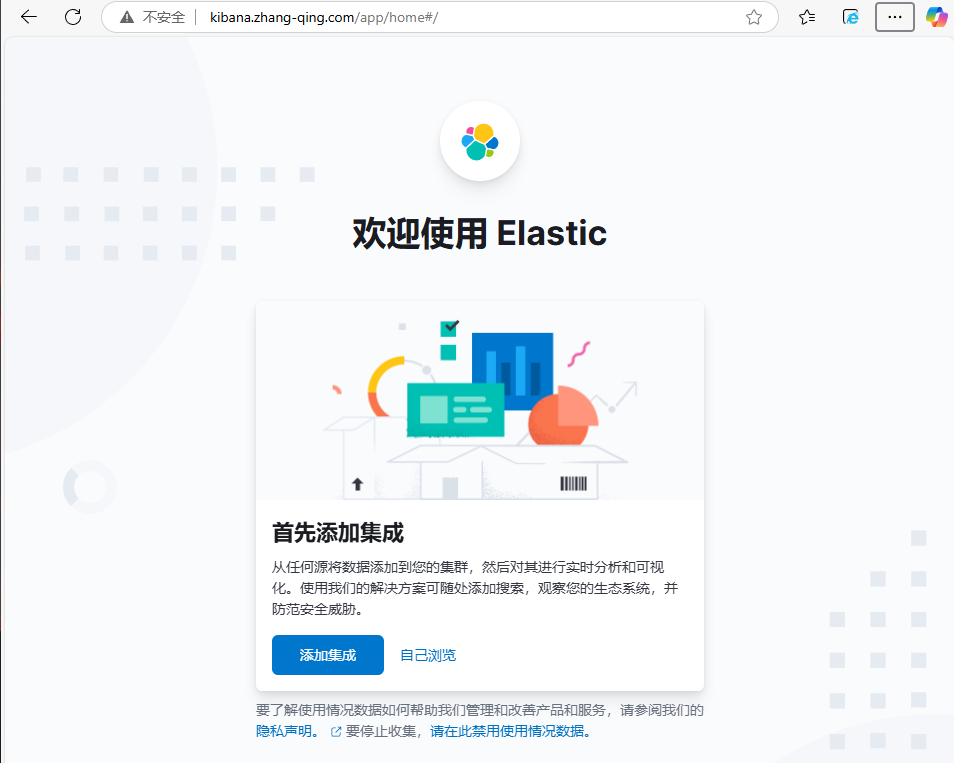
浏览器输入kibana.zhang-qing.com进行测试访问
© 版权声明
文章版权归作者所有,未经允许请勿转载。
THE END






暂无评论内容