
一、Helm管理公司内项目
1.1 准备工作
1、创建Helm Chart模板
[root@k8s-master01 ~]# mkdir helm
[root@k8s-master01 ~]# cd helm/
[root@k8s-master01 helm]# helm create demo
2、删除无用文件
[root@k8s-master01 helm]# cd demo/templates/
[root@k8s-master01 templates]# rm -rf hpa.yaml serviceaccount.yaml
3、参考2.9.1.2章节部署ingress-nginx
1.2 Helm Chart自动生成Deployment
1、修改values.yaml文件
[root@k8s-master01 ~]# vim helm/demo/values.yaml
# 开头添加下面内容
applications:
- name: demo-ui
  image: registry.cn-hangzhou.aliyuncs.com/abroad_images/demo-ui:v0.0.1
  resources: {}
  appPort: 80
  service:
    port: 80
    type: ClusterIP
  replicaCount: 1
  env:
  - name: project
    value: demo
- name: demo-receive
  image: registry.cn-hangzhou.aliyuncs.com/abroad_images/demo-receive:v0.0.1-upgrade
  resources: {}
  appPort: 80
  service:
    port: 80
    type: ClusterIP
  replicaCount: 2
  env:
  - name: SPRING_PROFILES_ACTIVE
    value: "k8supgrade"
  - name: SERVER_PORT
    value: "8080"
- name: demo-handler
  image: registry.cn-hangzhou.aliyuncs.com/abroad_images/demo-handler:v0.0.1-upgrade
  resources: {}
  appPort: 8080
  service:
    port: 80
    type: ClusterIP
  replicaCount: 1
  env:
  - name: SPRING_PROFILES_ACTIVE
    value: "k8supgrade"
  - name: SERVER_PORT
    value: "8080"
修改后完整配置文件
[root@k8s-master01 ~]# egrep -v "#|^$" helm/demo/values.yaml
applications:
- name: demo-ui
  image: registry.cn-hangzhou.aliyuncs.com/abroad_images/demo-ui:v0.0.1
  resources: {}
  appPort: 80
  service:
    port: 80
    type: ClusterIP
  replicaCount: 1
  env:
  - name: project
    value: demo
  ingress:
    enabled: true
    className: "nginx"
    annotations: {}
    hosts:
      - host: demo.test.com
        paths:
          - path: /
            pathType: Prefix
    tls: []
- name: demo-receive
  image: registry.cn-hangzhou.aliyuncs.com/abroad_images/demo-receive:v0.0.1-upgrade
  resources: {}
  appPort: 8080
  service:
    port: 8080
    type: ClusterIP
  replicaCount: 2
  env:
  - name: SPRING_PROFILES_ACTIVE
    value: "k8supgrade"
  - name: SERVER_PORT
    value: "8080"
  ingress:
    enabled: true
    className: "nginx"
    annotations:
      nginx.ingress.kubernetes.io/rewrite-target: /$2
    hosts:
      - host: demo.test.com
        paths:
          - path: /receiveapi(/|$)(.*)
            pathType: ImplementationSpecific
    tls: []
- name: demo-handler
  image: registry.cn-hangzhou.aliyuncs.com/abroad_images/demo-handler:v0.0.1-upgrade
  resources: {}
  appPort: 8080
  service:
    port: 80
    type: ClusterIP
  replicaCount: 1
  env:
  - name: SPRING_PROFILES_ACTIVE
    value: "k8supgrade"
  - name: SERVER_PORT
    value: "8080"
  ingress:
    enabled: false
    className: ""
    annotations: {}
    hosts:
      - host: demo.test.com
        paths:
          - path: /receiveapi(/|$)(.*)
            pathType: ImplementationSpecific
    tls: []
replicaCount: 1
image:
  repository: nginx
  pullPolicy: IfNotPresent
  tag: ""
imagePullSecrets: []
nameOverride: ""
fullnameOverride: ""
serviceAccount:
  create: true
  automount: true
  annotations: {}
  name: ""
podAnnotations: {}
podLabels: {}
podSecurityContext: {}
securityContext: {}
service:
  type: ClusterIP
  port: 80
ingress:
  enabled: false
  className: ""
  annotations: {}
  hosts:
    - host: chart-example.local
      paths:
        - path: /
          pathType: ImplementationSpecific
  tls: []
resources: {}
livenessProbe:
  httpGet:
    path: /
    port: http
readinessProbe:
  httpGet:
    path: /
    port: http
autoscaling:
  enabled: false
  minReplicas: 1
  maxReplicas: 100
  targetCPUUtilizationPercentage: 80
volumes: []
volumeMounts: []
nodeSelector: {}
tolerations: []
affinity: {}
2、修改deployment.yaml文件
[root@k8s-master01 ~]# vim helm/demo/templates/deployment.yaml
# 添加第1行内容
  1 {{- range .Values.applications -}}
# 修改第5行内容
  5   name: {{ .name  }}
# 第7行下面新增如下内容
  8   app: {{ .name  }}
# 删除第10行和第12行内容信息
 10   {{- if not .Values.autoscaling.enabled }}
 12   {{- end }}
# 修改现在第10行内容
 10   replicas: {{ .replicaCount }}
# 第13行内容下面新增如下内容
 14       app: {{ .name  }}
# 修改第17行内容
 17       {{- with .podAnnotations }}
# 修改第22行内容
 22         {{- include "demo.selectorLabels" . | nindent 6 }}
# 删除第23行到第26行内容
 23         {{- include "demo.labels" . | nindent 8 }}
 24         {{- with .Values.podLabels }}
 25         {{- toYaml . | nindent 8 }}
 26         {{- end }}
# 在第22行内容下面新增如下内容
 23         app: {{ .name  }}
# 删除第29行到第31行内容
 29       serviceAccountName: {{ include "demo.serviceAccountName" . }}
 30       securityContext:
 31         {{- toYaml .Values.podSecurityContext | nindent 8 }}
# 修改目前30行
 30         - name: {{ .name }}
# 删除第31行和第32行
 31           securityContext:
 32             {{- toYaml .Values.securityContext | nindent 12 }}
# 修改目前第31行内容
 31           image: "{{ .image }}"
# 修改目前第32行内容
 32           imagePullPolicy: {{ $.Values.image.pullPolicy }}
# 修改目前第25行内容
 25       {{- with $.Values.imagePullSecrets }}
# 修改目前第35行内容
 35               containerPort: {{ .appPort }}
# 删除目前第38行和第40行
 38             {{- toYaml .Values.livenessProbe | nindent 12 }}
 40             {{- toYaml .Values.readinessProbe | nindent 12 }}
# 在目前第37行下新增如下内容
 38             tcpSocket:
 39               port: http
# 在目前第40行下新增如下内容
 41             tcpSocket:
 42               port: http
# 修改目前第44行内容
 44             {{- toYaml .resources | nindent 12 }}
# 删除目前第45行到结尾内容
 45       {{- with .Values.volumes }}
 46       volumes:
 47         {{- toYaml . | nindent 8 }}
 48       {{- end }}
 49       {{- with .Values.nodeSelector }}
 50       nodeSelector:
 51         {{- toYaml . | nindent 8 }}
 52       {{- end }}
 53       {{- with .Values.affinity }}
 54       affinity:
 55         {{- toYaml . | nindent 8 }}
 56       {{- end }}
 57       {{- with .Values.tolerations }}
 58       tolerations:
 59         {{- toYaml . | nindent 8 }}
 60       {{- end }}
# 重新修改第7行内容
  7     {{- include "demo.labels" $ | nindent 4 }}
# 重新修改第13行内容
 13       {{- include "demo.selectorLabels" $ | nindent 6 }}
# 重新修改第22行内容
 22         {{- include "demo.selectorLabels" $ | nindent 6 }}
# 重新修改第1行内容
  1 {{ range .Values.applications -}}
# 重新修改第22行内容
 22         {{- include "demo.selectorLabels" $ | nindent 8 }}
# 重新在第1行下面添加如下内容
  2 ---
# 在第43行下面新增如下内容
 44           env:
 45           {{- toYaml .env | nindent 10 }}

# 添加最后1行内容
{{ end }}
修改后完整配置文件
[root@k8s-master01 ~]# egrep -v "#|^$" helm/demo/templates/deployment.yaml
{{ range .Values.applications -}}
---
apiVersion: apps/v1
kind: Deployment
metadata:
  name: {{ .name  }}
  labels:
    {{- include "demo.labels" $ | nindent 4 }}
    app: {{ .name  }}
spec:
  replicas: {{ .replicaCount }}
  selector:
    matchLabels:
      {{- include "demo.selectorLabels" $ | nindent 6 }}
      app: {{ .name  }}
  template:
    metadata:
      {{- with .podAnnotations }}
      annotations:
        {{- toYaml . | nindent 8 }}
      {{- end }}
      labels:
        {{- include "demo.selectorLabels" $ | nindent 8 }}
        app: {{ .name  }}
    spec:
      {{- with $.Values.imagePullSecrets }}
      imagePullSecrets:
        {{- toYaml . | nindent 8 }}
      {{- end }}
      containers:
        - name: {{ .name }}
          image: "{{ .image }}"
          imagePullPolicy: {{ $.Values.image.pullPolicy }}
          ports:
            - name: http
              containerPort: {{ .appPort }}
              protocol: TCP
          livenessProbe:
            tcpSocket:
              port: http
          readinessProbe:
            tcpSocket:
              port: http
          env:
          {{- toYaml .env | nindent 10 }}
          resources:
            {{- toYaml .resources | nindent 12 }}
{{ end }}
3、修改_helpers.tpl 文件
[root@k8s-master01 ~]# vim helm/demo/templates/_helpers.tpl
# 删除第38行内容
 38 {{ include "demo.selectorLabels" . }}
# 第41行内容下面添加如下内容
 42 project: {{ .Chart.Name }}
# 删除第49行和第50行
 49 app.kubernetes.io/name: {{ include "demo.name" . }}
 50 app.kubernetes.io/instance: {{ .Release.Name }}
# 第48行内容下新增如下内容
 49 project: {{ .Chart.Name }}
修改后完整配置文件
[root@k8s-master01 ~]# egrep -v "#|^$" helm/demo/templates/_helpers.tpl
{{/*
Expand the name of the chart.
*/}}
{{- define "demo.name" -}}
{{- default .Chart.Name .Values.nameOverride | trunc 63 | trimSuffix "-" }}
{{- end }}
{{/*
Create a default fully qualified app name.
We truncate at 63 chars because some Kubernetes name fields are limited to this (by the DNS naming spec).
If release name contains chart name it will be used as a full name.
*/}}
{{- define "demo.fullname" -}}
{{- if .Values.fullnameOverride }}
{{- .Values.fullnameOverride | trunc 63 | trimSuffix "-" }}
{{- else }}
{{- $name := default .Chart.Name .Values.nameOverride }}
{{- if contains $name .Release.Name }}
{{- .Release.Name | trunc 63 | trimSuffix "-" }}
{{- else }}
{{- printf "%s-%s" .Release.Name $name | trunc 63 | trimSuffix "-" }}
{{- end }}
{{- end }}
{{- end }}
{{/*
Create chart name and version as used by the chart label.
*/}}
{{- define "demo.chart" -}}
{{- printf "%s-%s" .Chart.Name .Chart.Version | replace "+" "_" | trunc 63 | trimSuffix "-" }}
{{- end }}
{{/*
Common labels
*/}}
{{- define "demo.labels" -}}
helm.sh/chart: {{ include "demo.chart" . }}
{{- if .Chart.AppVersion }}
app.kubernetes.io/version: {{ .Chart.AppVersion | quote }}
{{- end }}
app.kubernetes.io/managed-by: {{ .Release.Service }}
project: {{ .Chart.Name }}
{{- end }}
{{/*
Selector labels
*/}}
{{- define "demo.selectorLabels" -}}
project: {{ .Chart.Name }}
{{- end }}
{{/*
Create the name of the service account to use
*/}}
{{- define "demo.serviceAccountName" -}}
{{- if .Values.serviceAccount.create }}
{{- default (include "demo.fullname" .) .Values.serviceAccount.name }}
{{- else }}
{{- default "default" .Values.serviceAccount.name }}
{{- end }}
{{- end }}
1.3 Helm Chart自动生成Service
1、修改service.yaml文件
[root@k8s-master01 ~]# vim helm/demo/templates/service.yaml
#开头新增如下内容
{{ range .Values.applications -}}
---
#修改第6行内容
  6   name: {{ .name }}
#修改第8行内容
  8     {{- include "demo.labels" $ | nindent 4 }}
#修改第10行内容
 10   type: {{ .service.type }}
#修改第12行内容
 12     - port: {{ .service.port }}
#修改第17行内容
 17     {{- include "demo.selectorLabels" $ | nindent 4 }}
#第17行内容下面新增如下内容
 18     app: {{ .name  }}
#结尾新增如下内容
{{ end }}
修改后完整配置文件
[root@k8s-master01 ~]# egrep -v "#|^$"  helm/demo/templates/service.yaml
{{ range .Values.applications -}}
---
apiVersion: v1
kind: Service
metadata:
  name: {{ .name }}
  labels:
    {{- include "demo.labels" $ | nindent 4 }}
spec:
  type: {{ .service.type }}
  ports:
    - port: {{ .service.port }}
      targetPort: http
      protocol: TCP
      name: http
  selector:
    {{- include "demo.selectorLabels" $ | nindent 4 }}
    app: {{ .name  }}
{{ end }}
1.4 Helm Chart自动生成Ingress
1、修改ingress.yaml文件
[root@k8s-master01 ~]# vim helm/demo/templates/ingress.yaml
#开头新增如下内容
{{ range .Values.applications -}}
---
#修改第7行内容
  7   name: {{ .name }}
#第9行下面新增如下内容
 10     app: {{ .name  }}
#修改第16行内容
 16   {{- with .ingress.className }}
#修改第19行内容
 19   {{- if .ingress.tls }}
#修改第21行内容
 21     {{- range .ingress.tls }}
#修改第30行内容
 30     {{- range .ingress.hosts }}
#修改第41行内容
 41                 name: {{ .name }}
#修改第43行内容
 43                   number: {{ .service.port }}
#重新修改第9行内容
  9     {{- include "demo.labels" $ | nindent 4 }}
#重新修改第11行内容
 11   {{- with .ingress.annotations }}
#在第3行下新增如下内容
  4 {{ $servicePort := .service.port }}
#重新修改第44行
  44                   number: {{ $servicePort }}
#修改第3行内容
  3 {{- if .ingress.enabled -}}
#结尾新增如下内容
{{ end }}
修改后完整配置文件
[root@k8s-master01 ~]# egrep -v "#|^$"  helm/demo/templates/ingress.yaml
{{ range .Values.applications -}}
---
{{- if .ingress.enabled -}}
{{ $servicePort := .service.port }}
{{ $appName := .name }}
apiVersion: networking.k8s.io/v1
kind: Ingress
metadata:
  name: {{ .name }}
  labels:
    {{- include "demo.labels" $ | nindent 4 }}
    app: {{ .name  }}
  {{- with .ingress.annotations }}
  annotations:
    {{- toYaml . | nindent 4 }}
  {{- end }}
spec:
  {{- with .ingress.className }}
  ingressClassName: {{ . }}
  {{- end }}
  {{- if .ingress.tls }}
  tls:
    {{- range .ingress.tls }}
    - hosts:
        {{- range .hosts }}
        - {{ . | quote }}
        {{- end }}
      secretName: {{ .secretName }}
    {{- end }}
  {{- end }}
  rules:
    {{- range .ingress.hosts }}
    - host: {{ .host | quote }}
      http:
        paths:
          {{- range .paths }}
          - path: {{ .path }}
            {{- with .pathType }}
            pathType: {{ . }}
            {{- end }}
            backend:
              service:
                name: {{ $appName }}
                port:
                  number: {{ $servicePort }}
          {{- end }}
    {{- end }}
{{- end }}
{{ end }}
1.5 自定义Helm Chart管理整个项目
1、创建ns
[root@k8s-master01 ~]# k create ns demo
2、安装部署
[root@k8s-master01 ~]# cd helm/demo/
[root@k8s-master01 demo]# helm install  demo . -n demo
3、验证查看
# 查看pod
[root@k8s-master01 demo]# kgp -n demo
NAME                            READY   STATUS    RESTARTS   AGE
demo-handler-8b85b7d87-k6s4c    1/1     Running   0          15s
demo-receive-5b4565d5dd-bbsqn   1/1     Running   0          15s
demo-receive-5b4565d5dd-qp46j   1/1     Running   0          15s
demo-ui-d6ffdc7cc-6v74k         1/1     Running   0          15s

# 查看svc
[root@k8s-master01 demo]# kg svc -n demo
NAME           TYPE        CLUSTER-IP       EXTERNAL-IP   PORT(S)    AGE
demo-handler   ClusterIP   10.110.40.114    <none>        80/TCP     54s
demo-receive   ClusterIP   10.109.221.68    <none>        8080/TCP   54s
demo-ui        ClusterIP   10.100.219.157   <none>        80/TCP     54s

# 查看ingress
[root@k8s-master01 demo]# kg ingress -n demo
NAME           CLASS   HOSTS           ADDRESS     PORTS   AGE
demo-receive   nginx   demo.test.com   10.0.0.22   80      72s
demo-ui        nginx   demo.test.com   10.0.0.22   80      72s
4、测试访问,观察到测试访问成功
# 添加域名解析关系
[root@k8s-master01 demo]# echo "10.0.0.22 demo.test.com" >> /etc/hosts

# 测试访问成功
[root@k8s-master01 demo]# curl demo.test.com
<!doctype html>
<html lang="en">
  <head>
    <meta charset="UTF-8" />
    <link rel="icon" type="image/svg+xml" href="/vite.svg" />
    <meta name="viewport" content="width=device-width, initial-scale=1.0" />
    <title>Vite + Vue</title>
    <script type="module" crossorigin src="/assets/index-c04d2758.js"></script>
    <link rel="stylesheet" href="/assets/index-819d4460.css">
  </head>
  <body>
    <div id="app"></div>

  </body>
</html>
二、使用Harbor管理Helm Chart
2.1 新版(OCI方式直接存储)
1、将chart包进行打包
[root@k8s-master01 ~]# cd helm/
[root@k8s-master01 helm]# helm package demo
Successfully packaged chart and saved it to: /root/helm/demo-0.1.0.tgz
2、登录registry仓库
# http协议需要加--insecure参数
[root@k8s-master01 helm]# helm registry login 10.0.0.13 -uadmin -pHarbor12345 --insecure
WARNING: Using --password via the CLI is insecure. Use --password-stdin.
Login Succeeded
3、上传chart包
说明:需要在harbor上面提前创建charts仓库
# http协议需要加--plain-http参数
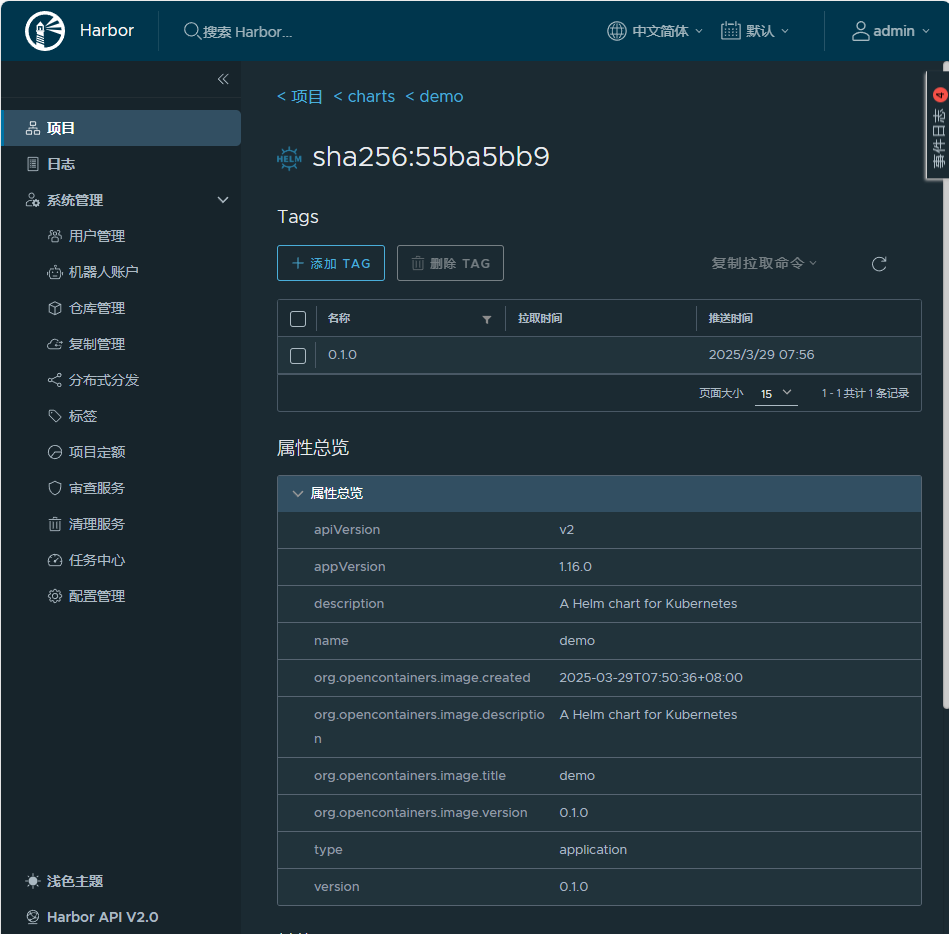
[root@k8s-master01 helm]# helm push demo-0.1.0.tgz oci://10.0.0.13/charts --plain-http